Loop
The Loop node repeats a sequence of nodes for each item of an input list, enabling batch processing across arrays.
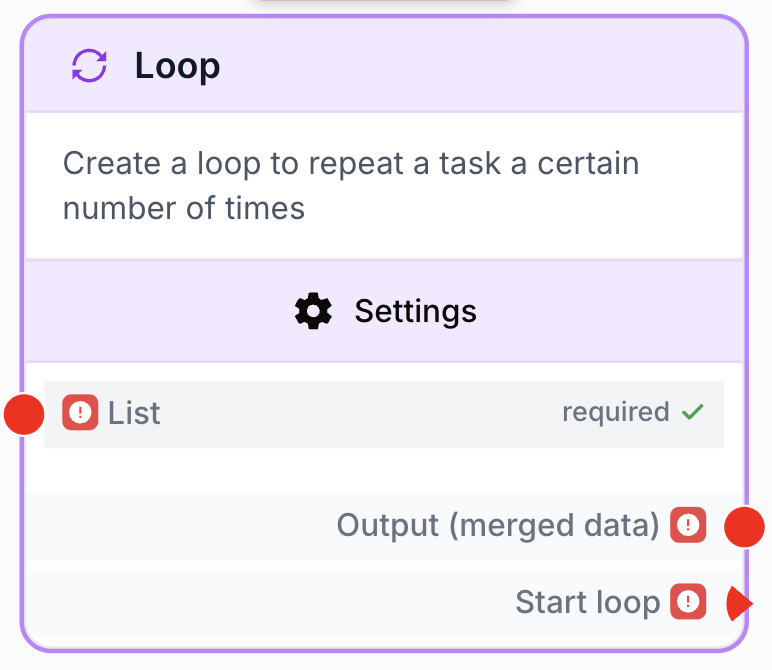
What does the Loop node do?
The Loop node (label: Loop Node) iterates over a list and runs the downstream branch once per item. It is a flow-control node: connect a list to its input, attach the per-iteration sub-workflow to its Start loop output, and collect the merged results from its Output (merged data) output once the loop is done.
Common use cases:
- Scrape a list of URLs coming from Google Sheets, an API or a manual list.
- Iterate through spreadsheet rows to enrich, transform or send each one.
- Apply an LLM prompt to every entry of an array (titles, descriptions, products).
- Fan out an integration call (HubSpot, BigQuery, WordPress) over a batch of records.
Quick setup
Follow these steps to add and configure the Loop node in your workflow:
Add the node to the canvas
Open the Node Library, go to Tools > Flow Control, then drag and drop the Loop Node onto your workspace.
Connect the input list
Connect the output of the upstream node (Google Sheets, API Connector, Create List, Split List, etc.) to the List input port. The value must be a JSON array.
Build the per-iteration branch
Connect the Start loop output to the first node of the sub-workflow that must run for each item. Inside that branch, reference the current item via the loop placeholder (e.g. {{Loop_0.currentItem}}).
Configure limits and error handling
Open the node settings to set Max Iterations (1–100), Delay between iterations (≥ 100 ms) and Error Handling (Skip & Continue or None).
Use the merged output
Connect the Output (merged data) port to the next node to consume the array of results aggregated from every iteration.
Configuration parameters
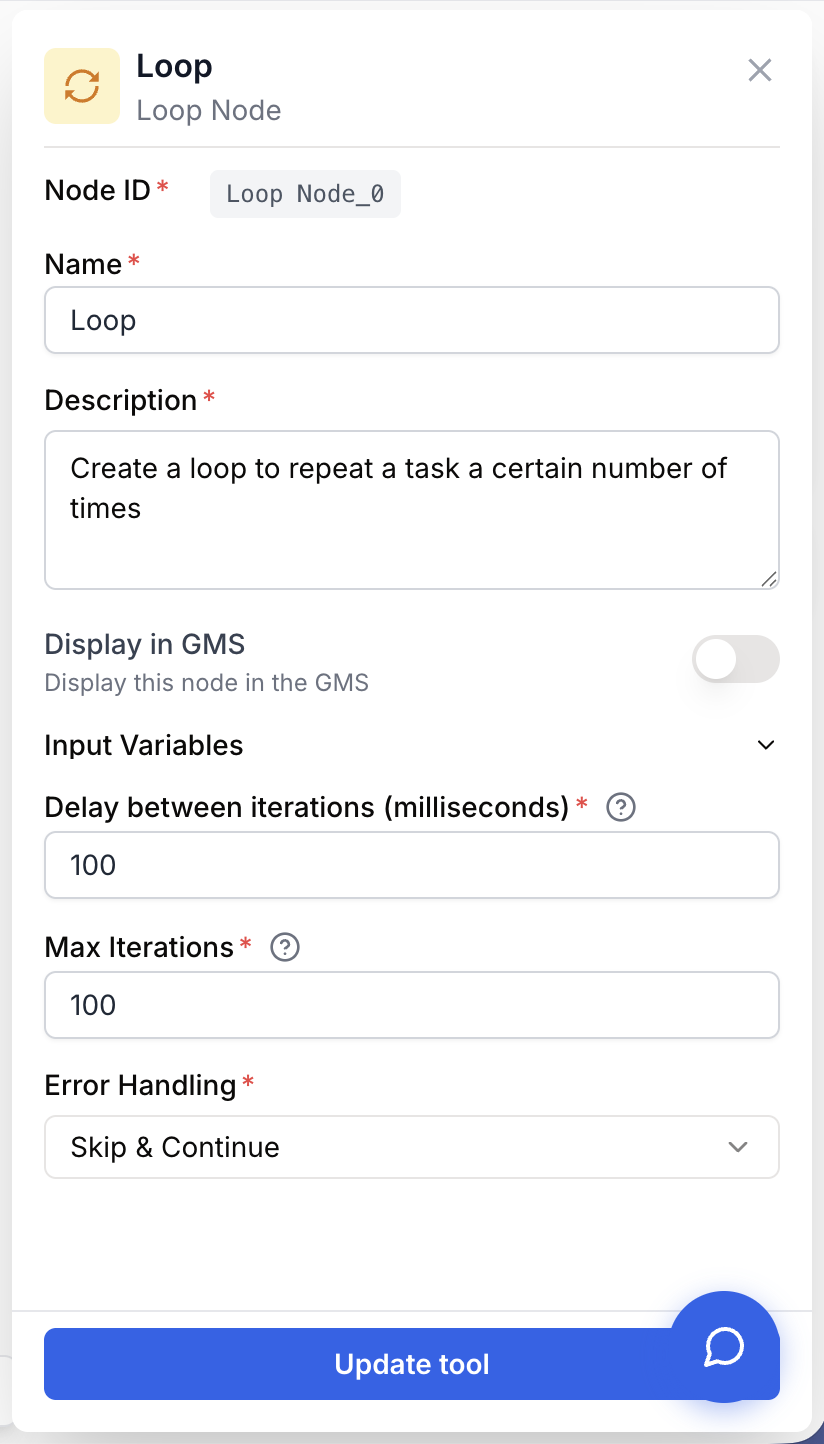
The Loop node has one input list, three configuration parameters and two outputs. Settings are validated by the form: invalid values are rejected before save.
Required fields
Name string required default: Loop Node name — Identifies the node on the canvas and in placeholders (e.g. Loop_0). Rename it (for example LoopOverUrls) to make placeholders inside the branch easier to read.
Description string required default: Create a loop to repeat a task a certain number of times. Node description — Short text describing what the loop iterates over. Useful for documentation and debugging.
List json required Input list — JSON array of items to iterate over. Coming from an upstream node output ({{GoogleSheets_0.data}}, {{ApiConnector_0.body.results}}) or a static list (["a", "b", "c"]). The runner raises “Loop node does not have a valid input list” if the value cannot be parsed as JSON.
Optional fields
Delay between iterations (milliseconds) number default: 100 Inter-iteration delay — Pause inserted between two consecutive iterations, in milliseconds. Minimum: 100 ms. Increase it (1000–3000 ms) when the inner branch hits external APIs to avoid rate limits.
Max Iterations number default: 100 Maximum iterations — Hard cap on the number of iterations executed. Range: 1 to 100. If the input list is larger than this value, only the first N items are processed.
Error Handling string default: Skip Error handling strategy — How the loop reacts to a failure inside one iteration.
Skip— Skip & Continue: the failing iteration is dropped, the loop moves on to the next item. Default.None— The loop stops on the first error and the whole workflow run fails.
Keep Skip & Continue for batch jobs where partial success is acceptable (scraping, enrichment). Switch to None when every item is critical (financial writes, transactional emails) so a failure surfaces immediately.
What does the node output?
The Loop node exposes two output ports. Connect each one to the relevant downstream branch.
Start loop json Per-iteration trigger. Connect the first node of your sub-workflow here. Inside the branch, the current item is exposed through Loop placeholders (typically {{Loop_0.currentItem}}, {{Loop_0.index}}, {{Loop_0.totalItems}}).
Output (merged data) json Aggregated array of results, available after the loop is done. Each entry corresponds to one iteration in input order. Skipped iterations (when Error Handling = Skip) are excluded from the merged data.
How to use the output
In Draft & Goal, you don’t need to look up a complex system-generated variable name. To use the result:
- Draw a connection from the Output (merged data) port of the Loop node.
- Connect it to the input of the next node (Filter List, JSON Path Extractor, Sheets Writer, etc.).
- In that next node, create and name your own variable (for example,
loop_results). The merged array is injected into it automatically.
Usage examples
Example 1: Scrape a list of URLs from Google Sheets
You read a list of URLs from a Google Sheet, scrape each page, then store the cleaned content back into a sheet.
graph LR
    A[Google Sheets reader] --> B[Loop Node]
    B --> C[Web Scraper]
    C --> D[HTML Cleaner]
    D --> E[Sheets writer]
    B --> E
Configuration:
List={{GoogleSheets_0.data}}Max Iterations=100Delay between iterations=2000(2 seconds, polite scraping)Error Handling=Skip
Inside the loop branch:
- Web Scraper URL =
{{Loop_0.currentItem.url}}
Example 2: Send a personalized email to every contact
You loop over a contact list, generate a personalized message with an LLM, then send it through the Email Sender. A single failing recipient must not block the rest.
graph LR
    A[Create List of contacts] --> B[Loop Node]
    B --> C[LLM personalize]
    C --> D[Email Sender]
    B --> E[Log results]
Configuration:
List={{CreateList_0.list}}Max Iterations=100Delay between iterations=1000Error Handling=Skip
Inside the loop branch:
- LLM prompt variable =
{{Loop_0.currentItem.name}} - Email Sender
to={{Loop_0.currentItem.email}}
Common issues
Workflow fails with: Loop node does not have a valid input list
Cause: The value connected to List is not parseable as a JSON array. The upstream node sent a string, an object, or an empty/null payload.
Solution: Confirm the upstream output is a JSON array. Wrap a manual value in ["..."]. For Google Sheets, point to the data array of rows. For API responses, target the field that actually holds the list (e.g. body.results).
Only the first 100 items are processed
Cause: Max Iterations is capped at 100 by the settings form. Any list longer than 100 items is truncated.
Solution: Pre-split the input with the Split List node into chunks of 100 or fewer, then chain several Loop runs. For very large datasets, batch upstream (Sheets pagination, API pagination) and run the workflow per batch.
The loop is too slow / takes minutes for a small list
Cause: Delay between iterations is set high, or the per-iteration branch contains slow nodes (LLM, scraping).
Solution: Lower the delay to its minimum (100 ms) when no external rate limit applies. Profile the inner branch and remove or cache slow steps when possible.
One iteration fails and stops the whole workflow
Cause: Error Handling is set to None. The first error aborts the loop and fails the run.
Solution: Switch Error Handling to Skip & Continue so the run survives individual failures. Add a Conditional node inside the branch to log or route failed items.
Merged output is empty even though the loop ran
Cause: The inner branch did not produce any output, or every iteration was skipped due to errors.
Solution: Open the run history, inspect each iteration, confirm the inner nodes return data. Temporarily flip Error Handling to None to surface the underlying error.
Best practices and pitfalls
Rename the Loop node (e.g. LoopOverContacts) before building the inner branch — placeholders inside the branch reference the node name, so a clear name makes {{LoopOverContacts_0.currentItem.email}} self-documenting.
Do not nest Loops blindly. Two nested Loop nodes multiply iterations: 50 categories × 50 products = 2 500 iterations, but each Loop is capped at 100. Plan the cap on each level and pre-aggregate when possible to stay within the 100-iteration ceiling.
How does it fit into a workflow?
The Loop node sits between a list-producing node and a per-item processing branch, then re-merges the results downstream. A typical pattern:
graph LR
    Source[Google Sheets / API / Create List] --> Loop[Loop Node]
    Loop -->|Start loop| Inner[Per-item branch
<br/>scrape / LLM / write]
    Loop -->|Output merged data| After[Aggregator
<br/>Filter / JSON Path / Sheets]
Related nodes
Branch logic inside the Loop to route items based on a condition before processing.
Split a large list into batches of ≤ 100 items so each batch fits the Loop iteration cap.
Build a static or dynamic array to feed directly into the Loop input.
Trim the merged output of the Loop to keep only the iterations that match a rule.
Count entries in the merged Loop output for reporting or branching.