Select
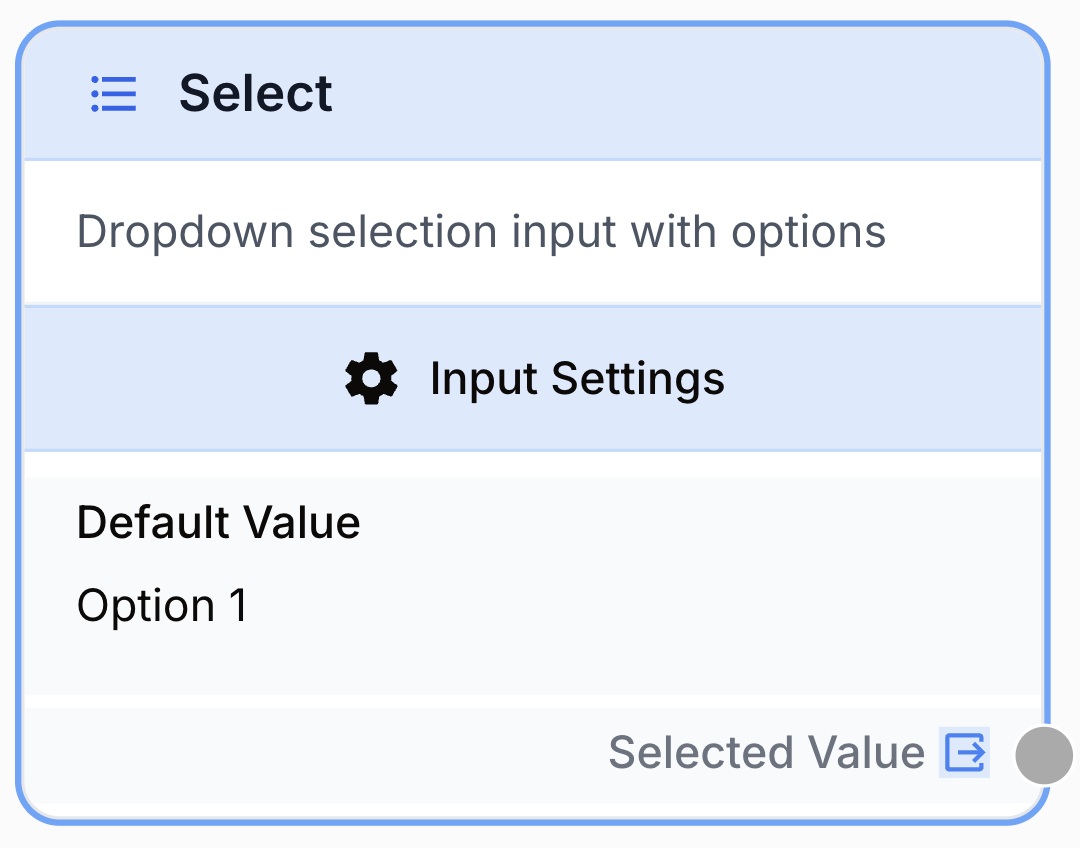
The Select node provides a dropdown input that lets users pick a value from a predefined list of options when running the workflow.
What does the Select node do?
The Select node is an input node that exposes a dropdown menu at workflow runtime. The user picks one value from a predefined list of options, and that value is forwarded to downstream nodes as a single string output. It is the right choice whenever a workflow must branch, parameterize, or filter based on a fixed set of categorical choices rather than free-form text.
Common use cases:
- Letting a user pick a content category, language, tone, or template before an LLM generates output.
- Routing a workflow through a
Conditional Nodebased on a user-selected processing mode. - Restricting an end user to a curated list of values (regions, products, brands) to avoid typos and free-text noise.
- Showing human-friendly labels (e.g. “France”, “Germany”) while passing technical values (e.g.
fr,de) downstream.
Quick setup
Follow these steps to add and configure the Select node in your workflow:
Add the node to the canvas
Open the Node Library, go to Inputs, then drag and drop the Select node onto your workspace.
Define the list of values
Open the node settings. In the Values section, click + Add to enter each option that will appear in the dropdown. At least one value is required.
(Optional) Enable custom display labels
Toggle Use Custom Display Labels if you want the dropdown to show different text than the actual value passed downstream. Then fill the Display Labels array — entries must be in the same order as Values.
Set the default value
In the Default Value field, type the value that should be pre-selected when the workflow runs. It must match exactly one of the entries in Values.
Connect the output
Connect the Select node’s output port to the input of the next node (for example, an LLM node, a Conditional Node, or a Filter List). The selected value will be injected at runtime.
Configuration parameters
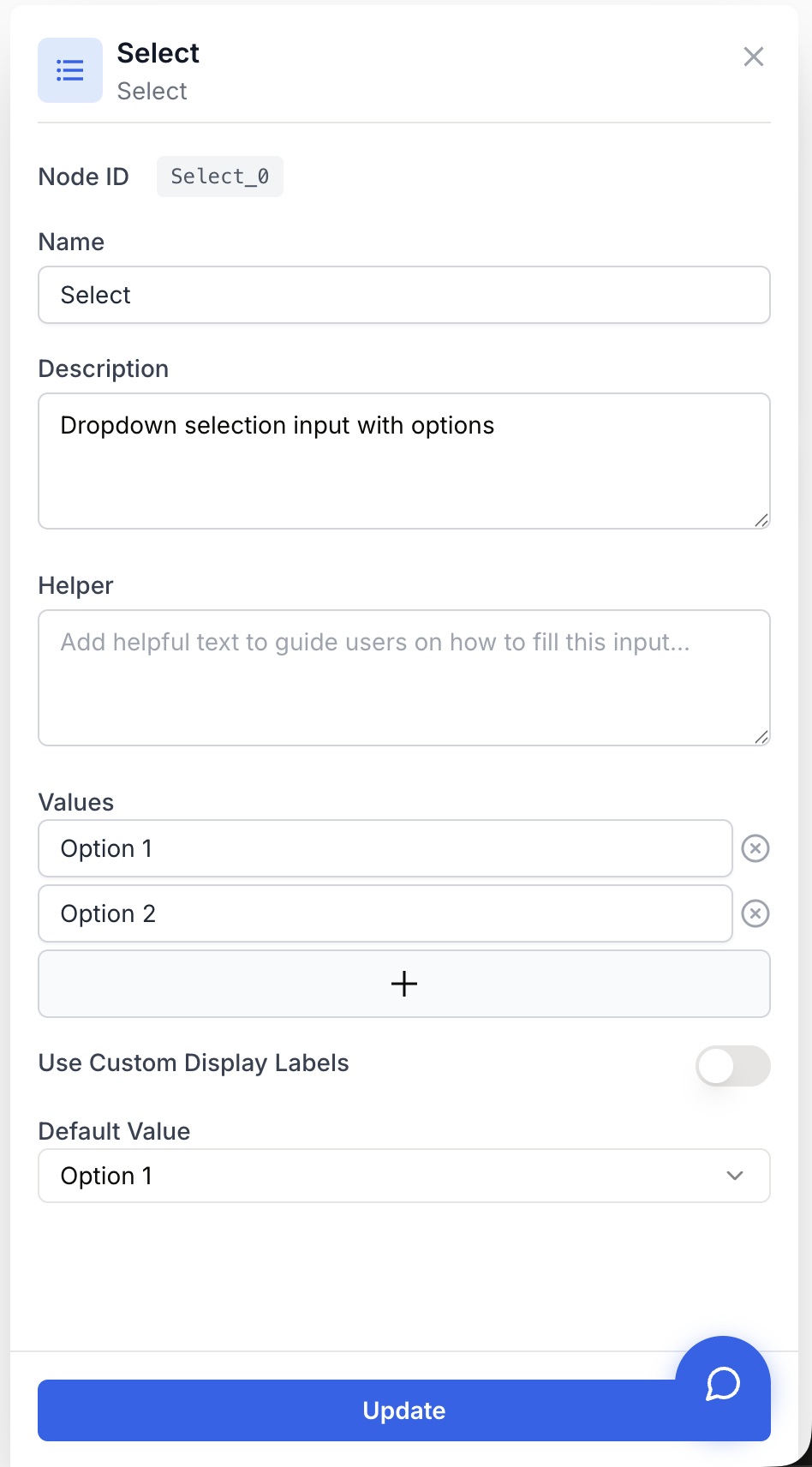
The Select node has no upstream input port — its value is collected from the end user when the workflow is launched. All configuration happens in the settings panel.
Required fields
Name string required default: Select Node name — Used to reference this input throughout the workflow (e.g. Select_0.output). Rename it to something descriptive such as language_picker to make downstream variables self-explanatory.
values array required default: ["Option 1", "Option 2"] List of selectable values — The actual values the user can pick from. Each entry is the string that will be emitted on the output if the user selects it. Add or remove entries with the + Add button.
defaultValue string required default: Option 1 Default selected value — The option that is pre-selected when the workflow runs. Must exactly match one of the entries in values — otherwise the dropdown will start empty and the workflow may fail at runtime.
Optional fields
useCustomDisplay boolean default: false Use Custom Display Labels — When enabled, the dropdown shows the entries from displayLabels to the user, while the workflow receives the corresponding entry from values. Use this to decouple human-readable labels from machine-friendly values.
displayLabels array default: ["", ""] Display labels — The labels shown in the dropdown when useCustomDisplay is true. Order matters: the label at index i is paired with the value at index i in values. The arrays must have the same length.
Combine Use Custom Display Labels with values like fr, en, de and displayLabels like French, English, German. The user sees the language name; downstream nodes get the ISO code, ready to feed an LLM or a translation API.
What does the node output?
The Select node emits a single string output corresponding to the value the user picked from the dropdown — never the display label, even when custom display labels are enabled.
output string The value the user selected from the dropdown. This is the entry from the values array, not the entry from displayLabels. In downstream nodes you can reference it as {{Select_0.output}} (replace Select_0 with the actual node name).
Usage examples
Example 1: Category-driven content generation
Let a user pick a content category, then route that choice into an LLM prompt.
Configuration:
values:["Blog Post", "Product Description", "Social Post"]useCustomDisplay:falsedefaultValue:Blog Post
Downstream usage in an LLM prompt:
Write a {{Select_0.output}} about the following topic: {{Text_0.output}}graph LR
A[Select: Content Category] --> B[LLM]
B --> C[Find and Replace]
C --> D[WordPress Post Create]Example 2: Language picker with friendly labels
Show readable language names to the user but pass ISO codes to the rest of the workflow.
Configuration:
values:["fr", "en", "de", "es"]useCustomDisplay:truedisplayLabels:["French", "English", "German", "Spanish"]defaultValue:en
The user sees French / English / German / Spanish in the dropdown; the LLM receives a clean two-letter code in {{Select_0.output}}.
Example 3: Conditional workflow branching
Use the Select output as the discriminator for a Conditional Node.
Configuration:
values:["fast", "thorough"]defaultValue:fast
graph LR
    A[Select: Mode] --> B{Conditional}
    B -->|fast| C[Quick LLM]
    B -->|thorough| D[Agent]
    C --> E[Output]
    D --> E
Common issues
The dropdown opens empty when I run the workflow
Cause: The defaultValue does not match any entry in the values array (typo, extra space, different casing).
Solution: Open the settings and copy-paste one of the values entries into defaultValue. The match is exact and case-sensitive.
Display labels are ignored — the user still sees the raw values
Cause: useCustomDisplay is set to false, or displayLabels is shorter than values.
Solution: Enable Use Custom Display Labels and make sure displayLabels has exactly the same number of entries as values, in the same order.
A downstream node receives the display label instead of the value
Cause: The Select output is always the underlying value — but if values and displayLabels were swapped at configuration time, the wrong strings end up in values.
Solution: Re-open the settings. Confirm that values contains the strings you want emitted downstream, and displayLabels only contains the human-friendly versions.
Best practices
Keep values short and machine-friendly (fr, blog_post, mode_fast) and put the pretty wording in displayLabels. Downstream prompts, conditionals, and filters become far more reliable than when they have to match against free-form sentences.
Changing the values list after a workflow is in production can break the defaultValue and any downstream Conditional Node that branches on specific strings. Update both ends together, and re-test the workflow before saving.
Related nodes
Use a free-form text input when the user’s answer cannot be enumerated upfront.
Branch the workflow based on the value selected in the dropdown.
Feed the selected value into a prompt to drive category-aware generation.
Filter a list of items using the user’s selection as the matching criterion.