Google Search
The Google Search node fetches real-time Google search results (SERP) for any query, with support for multiple search types, geo-targeting, and URL exclusion.
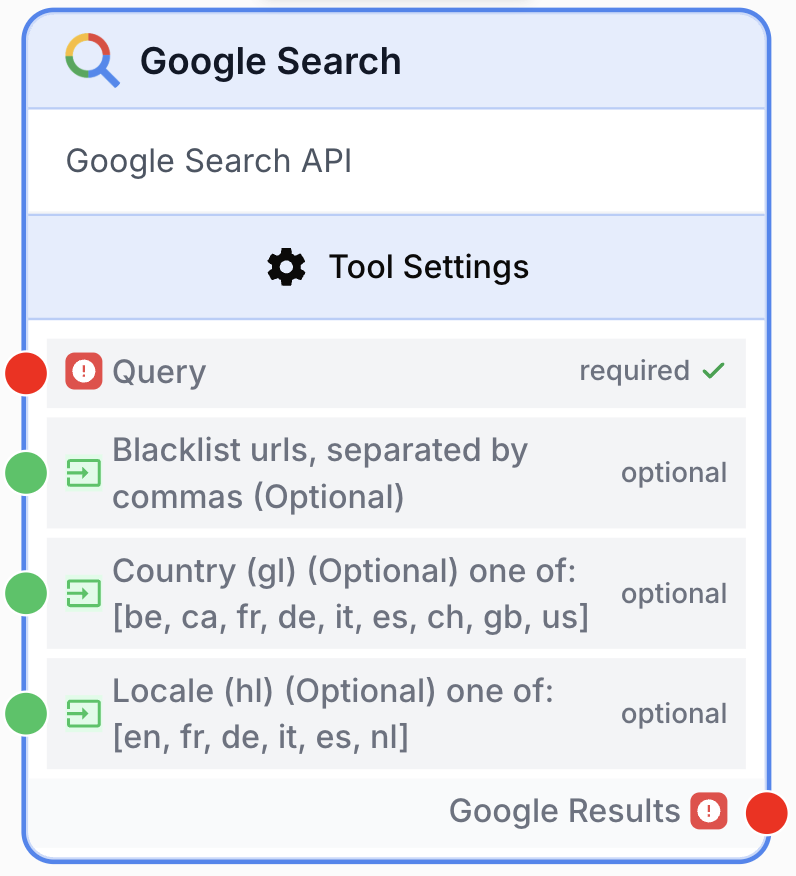
What does the Google Search node do?
The Google Search node fetches real-time search engine results page (SERP) data from Google for any query. It supports multiple search types (web, news, images, videos, shopping, places, maps, scholar, patents) and returns structured results including organic listings, People Also Ask, related searches, and more.
Common use cases:
- Tracking organic rankings for target keywords across countries and locales
- Analyzing competitor SERP presence and visibility for strategic queries
- Finding top-ranking content on a topic for content research and inspiration
- Monitoring news coverage for brands, products, or industry topics
- Discovering local businesses with geo-targeted Places searches
Quick setup
Connect the Serper Dev integration
Open Settings > Integrations and connect the Serper Dev integration. The Google Search node uses Serper.dev under the hood to query Google.
Add the node to the canvas
Open the Node Library, go to Integrations > Google, then drag and drop the Google Search node onto your workspace.
Connect the query input
Connect the input port of the Query field to an upstream node (Text Input, LLM, or any node producing a string). You can also pass a JSON array of queries to run multiple searches in one execution.
Configure search type and geo-targeting
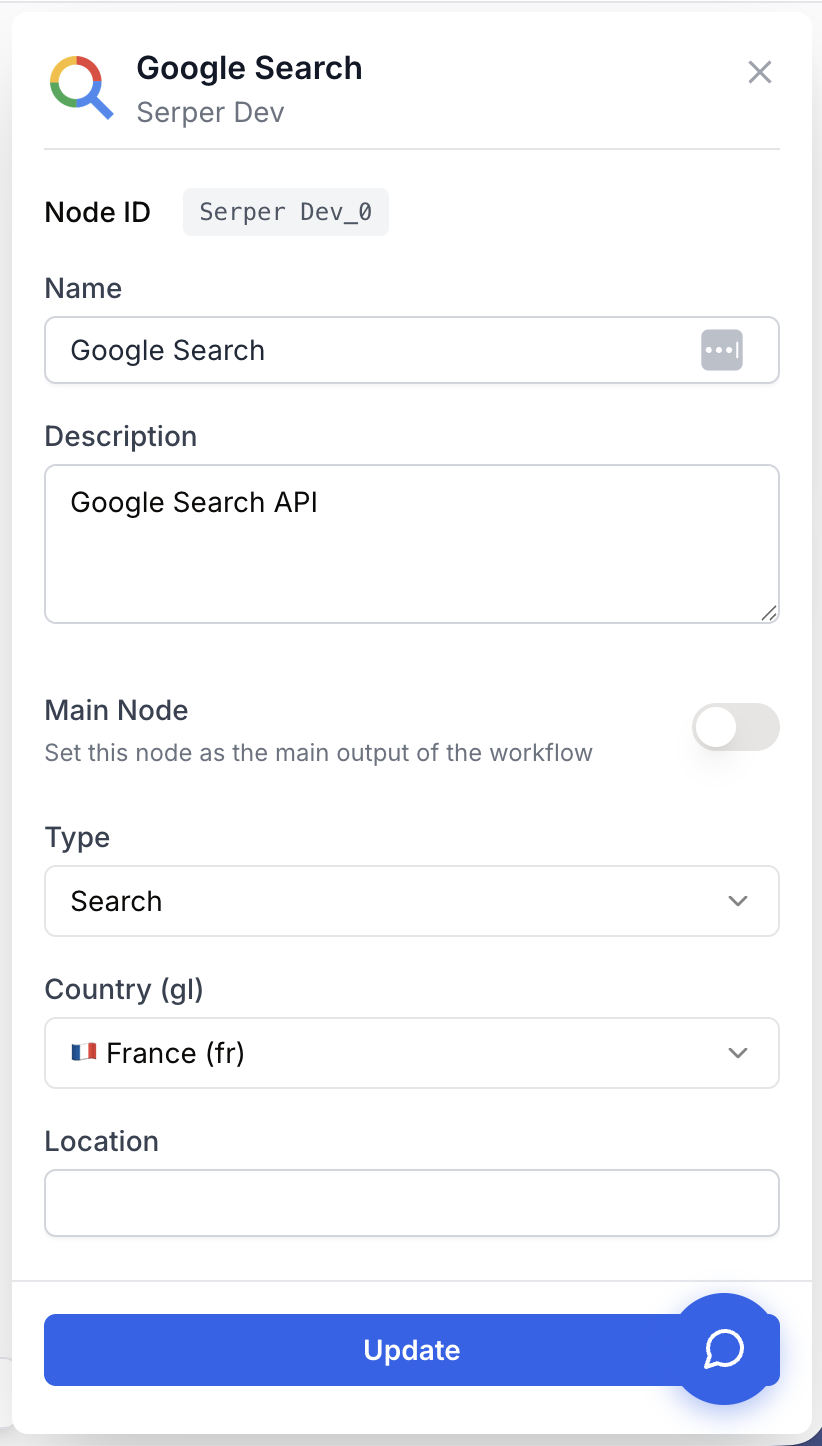
In the node settings, choose the Type of search (Search, News, Images, etc.), the Country (gl), the Locale (hl), and an optional Location for geo-targeted results.
Connect the output
Connect the Google Results output port to the next node. The node returns a JSON string you can parse with a JSON Path Extractor or feed to an LLM.
Configuration parameters
Required fields
query string required Search query — The Google query to run. Supports all Google search operators (site:, intitle:, inurl:, exact-match quotes, exclusions). You can also pass a JSON array of strings to batch several queries in a single execution.
type select required default: Search Search type — Which Google vertical to query. One of: Search, Images, Videos, News, Shopping, Places, Maps, Scholar, Patents. The output structure depends on this choice.
Optional fields
input_blacklist_urls string Blacklist URLs (input) — Comma-separated list of URLs to exclude from results, passed as a connectable input. Each URL is appended to the query as a -inurl: operator. Merged with the static blacklist_urls parameter.
input_gl string Country override (input) — Connectable input that overrides the static Country parameter at runtime. One of: be, ca, fr, de, it, es, ch, gb, us.
input_hl string Locale override (input) — Connectable input that overrides the static Locale parameter at runtime. One of: en, fr, de, it, es, nl.
country select default: France (fr) Country (gl) — Google country parameter. Affects which regional results are returned. Defaults to France.
location string Location — Specific city or region for geo-targeted results, e.g. Paris, France. Especially useful with Places and Maps search types.
locale select default: French (fr) Locale (hl) — Google language parameter. Affects the language of the result snippets and metadata. Defaults to French.
page number default: 1 Page number — Which page of results to fetch. Page 1 returns positions 1 to 10, page 2 returns 11 to 20, and so on.
auto_correct boolean default: true Auto-correct — When enabled, Google auto-corrects misspelled queries. Disable it to enforce literal matching when you query brand names or rare terms.
blacklist_urls textarea Blacklist URLs (static) — Comma-separated list of URLs to exclude from results. Each entry is appended to the query as a -inurl: operator. Example: example.com, ads.example.fr, *.spam.com.
The Google Search node accepts a single query string OR a JSON array of strings. Passing an array (e.g. ["seo tools", "seo audit"]) executes one search per query in a single node run.
What does the node output?
The node returns a JSON string whose structure depends on the Type parameter. For a standard Search, results land in the organic array; News populates news, Images populates images, Maps and Places populate places.
{
  "searchParameters": {
    "q": "site:example.com",
    "gl": "fr",
    "hl": "fr",
    "type": "search"
  },
  "organic": [
    {
      "title": "Page Title",
      "link": "https://example.com/page",
      "snippet": "Description of the page...",
      "position": 1
    }
  ],
  "peopleAlsoAsk": [
    {
      "question": "What is...?",
      "snippet": "Answer...",
      "title": "Source Title",
      "link": "https://example.com"
    }
  ],
  "relatedSearches": [
    { "query": "related search term" }
  ]
}
results string A JSON string containing the SERP payload returned by Serper.dev. Top-level keys vary by search type: organic, news, images, videos, shopping, places, peopleAlsoAsk, relatedSearches, knowledgeGraph, etc.
Usage examples
Example 1: SEO keyword ranking check
Track where your domain ranks for a target keyword in France, page 1.
Configuration:
- Query:
best SEO tools 2025 - Type: Search
- Country: France (fr)
- Locale: French (fr)
- Page: 1
Connect the output to a JSON Path Extractor with $.organic[*].link to pull the list of ranking URLs, then to a Conditional node to check whether your domain is present.
Example 2: Brand news monitoring across regions
Watch for press coverage of your brand in two countries by passing the country dynamically.
Configuration:
- Query:
'Draft and Goal' OR 'dng.ai'(use single quotes inside the query value) - Type: News
- input_gl: connected to a Text Input cycling through
us,gb,fr
Run inside a Loop node to iterate over a list of country codes.
Example 3: Local business discovery
Find Italian restaurants in a specific city using geo-targeting.
Configuration:
- Query:
restaurant italien - Type: Places
- Country: France (fr)
- Location: Paris, France
The output places array includes name, address, rating, and CID for each business.
Example 4: Filtered competitor research
Exclude noisy domains while researching a query so the SERP focuses on real competitors.
Configuration:
- Query:
seo audit checklist - Type: Search
- Blacklist URLs:
pinterest.com, reddit.com, quora.com
Each blacklist entry is appended as a -inurl: operator at runtime.
Common issues
The node fails with a Serper Dev integration error
Cause: The Serper Dev integration is not configured or the API key is invalid.
Solution: Open Settings > Integrations, locate Serper Dev, and add or refresh the API key from your serper.dev dashboard.
No results returned even though the query is valid on google.com
Cause: Your Country and Locale combination, the Location value, or restrictive blacklist URLs filter every result out.
Solution: Drop the Location first, broaden Country and Locale, and remove blacklist URLs one by one until results reappear.
The node returned a different structure than expected
Cause: The output schema depends on the Type parameter. A News search returns a news array, not organic.
Solution: Check the Type in the node settings and adjust your downstream JSON Path Extractor to match ($.news[*], $.images[*], $.places[*], etc.).
Auto-corrected results do not match my exact query
Cause: Google rewrote the query because Auto correct is enabled.
Solution: Disable Auto correct in the node settings to force the literal query, useful for brand names, rare terms, or product SKUs.
Invalid JSON format error when passing multiple queries
Cause: The query input starts with [ or { but is not parseable JSON.
Solution: Either pass a plain string (single query) or a valid JSON array of strings (e.g. ['seo', 'sea'] rendered as JSON). Validate the upstream node output before connecting it.
Best practices
Combine Google search operators in the Query field to narrow results: site:, intitle:, inurl:, exact-match quotes, and - exclusions all work as on google.com.
Pass a JSON array of queries to run multiple searches in one node execution, then iterate over the result with a Loop node — fewer nodes, fewer NATS roundtrips.
Each Google Search call consumes one Serper.dev credit per query in the array. Watch your quota when looping over large keyword lists.
Geographic results drift over time. For benchmarks (rank tracking, share-of-voice), schedule the workflow at fixed intervals and store outputs in a database to compare runs.
How does it fit into a workflow?
The Google Search node typically sits at the start of a SEO or research pipeline, feeding a list of URLs or snippets into downstream extraction and analysis nodes.
graph LR
    Input[Text Input keyword] --> Search[Google Search]
    Search --> Extract[JSON Path Extractor organic links]
    Extract --> Loop[Loop over URLs]
    Loop --> Scraper[Web Scraper]
    Scraper --> LLM[LLM summarises content]
Related nodes
Count the exact number of Google results for a query without fetching the SERP payload.
Pull search analytics (impressions, clicks, CTR, position) from your own Search Console properties.
Scrape the content of the URLs returned by Google Search for further analysis.
Extract specific fields (links, snippets, positions) from the SERP JSON payload.
Summarize, classify, or analyze the SERP results returned by Google Search.
Iterate over a list of keywords or returned URLs to process them one by one.