Majestic Backlink Data
The Majestic Backlink Data node retrieves detailed backlink profiles for one or more URLs or domains using the Majestic API.
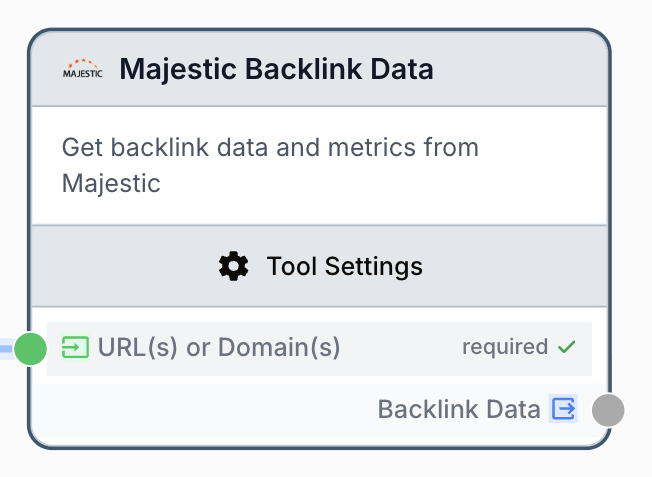
What does the Majestic Backlink Data node do?
The Majestic Backlink Data node calls the Majestic GetBackLinkData endpoint to retrieve a detailed list of backlinks pointing to one or more URLs or domains. For each backlink it exposes source URL and title, anchor text, link flags (NoFollow, image, redirect, frame, deleted, alt text), Trust Flow and Citation Flow at source and (optionally) referring-domain level, plus first-indexed and last-seen dates.
Common use cases:
- Auditing the backlink profile of a domain before a migration or a disavow campaign.
- Bulk-checking backlinks for several URLs in a single workflow run.
- Feeding an LLM with raw backlink data to summarize link risk or topical relevance.
Quick setup
Connect a Majestic integration
Open the node settings and select an existing Majestic Integration, or create one from the Integrations page using your Majestic API key.
Add the node to the canvas
Open the Node Library, go to Integrations > SEO Tools > Majestic, then drag and drop the Majestic Backlink Data node onto your workflow.
Provide URLs or domains
Connect the input port to a list of URLs or domains (one per line), or paste them directly into the URL(s) or Domain(s) field of the node.
Configure the data source and volume
Pick the Data source (Fresh or Historic), the Number of backlinks (1 to 5000), and whether to include Domain information.
Connect the output
Connect the output Backlink Data to the next node (LLM, JSON Path Extractor, Sheets Writer) and create a variable name there to consume the JSON payload.
Configuration parameters
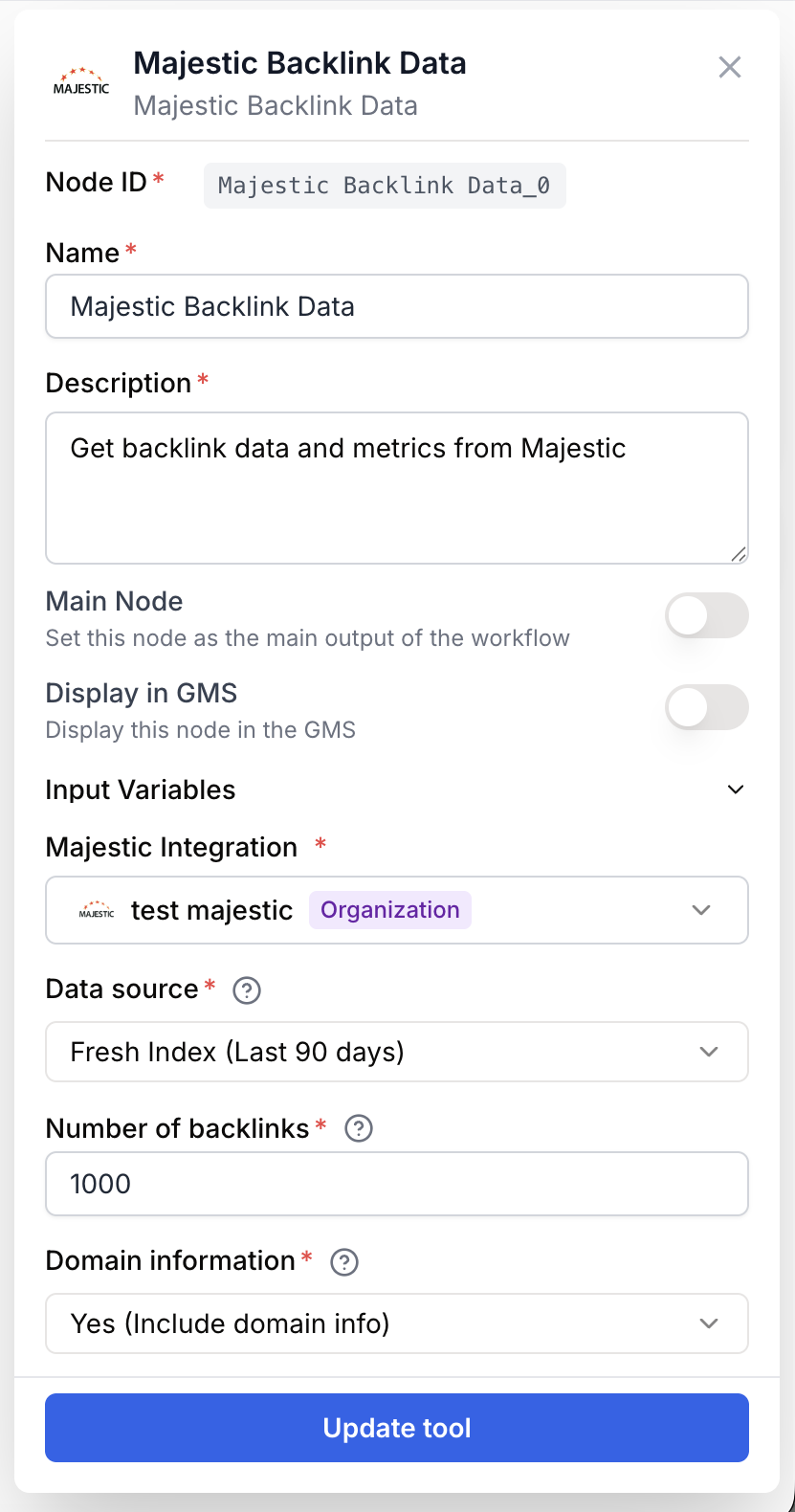
Configure what the node analyzes and how much data it returns.
Required fields
Name string required default: Majestic Backlink Data Node name — Used to identify this node in the canvas and in run logs (for example, Backlinks competitor A).
Description string required default: Retrieves detailed backlink data: profiles (NoFollow, images, redirects), quality (source TF/CF), target pages and indexing dates. Node description — Short phrase describing the role of this specific instance.
URL(s) or Domain(s) string[] required Items to analyze — One URL or domain per line. Accepts plain text, JSON arrays, and nested lists coming from upstream nodes; duplicates are removed automatically.
Majestic Integration integration required Majestic account — The integration that holds the Majestic API key used for the request. Required to authenticate the call.
Data source string required default: Fresh Index — Fresh returns data from the last 90 days, Historic returns the full historical index. Choose Historic for older or lost backlinks.
Number of backlinks number required default: 1000 Backlink count — Number of detailed backlinks to retrieve, between 1 and 5000. Higher values consume more Majestic credits.
Domain information string required default: Yes (Include domain info) Include referring-domain metrics — When set to Yes, each backlink includes the source domain, its Trust Flow and Citation Flow.
Pass several domains at once on the input port to reuse the same configuration for a competitive audit. The node loops over each item and aggregates the results in a single output.
What does the node output?
The node returns a JSON string with one entry per processed item, the requested data source, the formatted backlinks, and counters for total, successful, and failed items.
How to use the output
- Draw a connection from the
Backlink Dataoutput port to the next node. - In that node, create a variable name (for example,
backlinks_json). - Use a JSON Path Extractor or an LLM downstream to read fields like
results[0].backlinks[*].source_url.
Backlink Data string JSON string containing results (array, one object per item with item, datasource, backlinks, total_backlinks, requested_count, include_domain_info), total_items_processed, successful, and failed.
Usage examples
Example 1: Auditing a single domain
Retrieve the top 500 fresh backlinks for a domain and feed them to an LLM that classifies link risk.
Configuration:
URL(s) or Domain(s)=example.comData source=FreshNumber of backlinks=500Domain information=Yes (Include domain info)
Generated output (excerpt):
{
  "results": [
    {
      "item": "example.com",
      "datasource": "fresh",
      "backlinks": [
        {
          "source_url": "https://blog.partner.org/post",
          "source_title": "Top SEO tools",
          "source_trust_flow": 35,
          "source_citation_flow": 41,
          "anchor_text": "great resource",
          "link_type": "Text",
          "is_nofollow": false,
          "first_indexed_date": "2024-01-10",
          "last_seen_date": "2024-04-22",
          "domain_info": {
            "domain": "partner.org",
            "domain_trust_flow": 48,
            "domain_citation_flow": 52
          }
        }
      ],
      "total_backlinks": 500,
      "requested_count": 500,
      "include_domain_info": true
    }
  ],
  "total_items_processed": 1,
  "successful": 1,
  "failed": 0
}
Example 2: Bulk competitive audit
Compare the backlink profile of three competitors in a single run.
Configuration:
URL(s) or Domain(s)=competitor-a.com competitor-b.com competitor-c.comData source=HistoricNumber of backlinks=2000Domain information=No (Links only)
The output contains one entry per competitor under results, plus the successful and failed counters so you can spot items that returned an error.
Common issues
Majestic: API key not configured. Please add integration in settings.
Cause: No Majestic integration is selected on the node, or the integration has no API key.
Solution: Open the node settings, pick a valid integration in the Majestic Integration field, or create one from the Integrations page using your Majestic API key.
At least one item is required
Cause: The URL(s) or Domain(s) field is empty and no upstream node provided items.
Solution: Either type at least one URL or domain in the field, or connect a list-producing node (Create List, Sheets Reader) to the input port.
One of the items returns an error in results
Cause: The Majestic API rejected that specific item (invalid format, no data in the chosen index, quota reached). Other items keep running.
Solution: Check the error field of the failing entry, switch the Data source to Historic if the URL has no recent backlinks, and verify your remaining Majestic quota.
Best practices and pitfalls
Lower the Number of backlinks while building a workflow to save Majestic credits, then raise it once the rest of the pipeline is validated.
Setting Domain information to Yes makes each backlink object larger. For very high counts, keep it on No (Links only) unless your downstream logic actually needs domain TF/CF.
How does it fit into a workflow?
Majestic Backlink Data typically sits between an input list of targets and a node that extracts, scores, or stores the backlinks.
graph LR
    Input[List of domains] --> Mj[Majestic Backlink Data]
    Mj --> Ext[JSON Path Extractor]
    Ext --> LLM[LLM analyzes link risk]
    LLM --> Sheets[Sheets Writer]
Related nodes
Get the distribution of anchor texts pointing to a URL or domain.
Track the evolution of backlinks over time for a target.
Inspect Majestic Trust Flow and Citation Flow summary metrics for a target.
Extract specific fields from the Backlink Data JSON output.