Human in the Loop
The Human in the Loop node pauses workflow execution and asks a human reviewer to validate content before continuing.
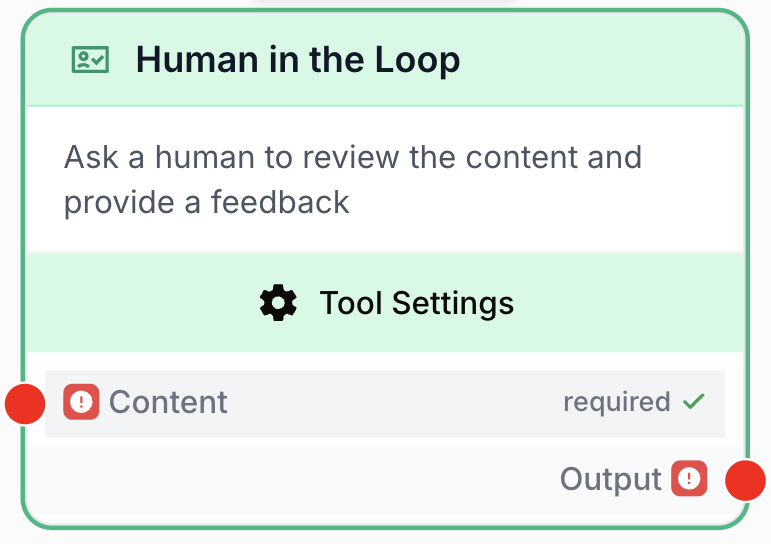
What does the Human in the Loop node do?
The Human in the Loop node pauses workflow execution and presents content to a human reviewer for approval before resuming. It lets you insert a manual checkpoint at any critical step in your workflow — to review AI-generated content, validate data, or approve actions before they run downstream.
Common use cases:
- Reviewing AI-generated articles or summaries before publishing them to a CMS.
- Validating extracted data before writing it to an external system (CRM, database, spreadsheet).
- Quality-checking email content or customer-facing messages before they are sent.
- Approving sensitive or irreversible operations before they execute.
Quick setup
Follow these steps to add and configure the Human in the Loop node in your workflow:
Add the node to the canvas
Open the Node Library, go to Tools > Flow Control, then drag and drop the Human in the Loop node onto your workspace.
Connect the input
Connect the Content input port (on the left of the node) to the output of the upstream node carrying the data to review (for example an LLM, a Web Scraper, or a JSON Path Extractor).
Write a custom message (optional)
Open the node settings and fill the Custom Message field to tell the reviewer exactly what to check or which criteria to apply.
Connect the output
Connect the Output port (on the right) to the next node. Execution resumes and the approved content flows through once the reviewer has validated it.
Configuration parameters
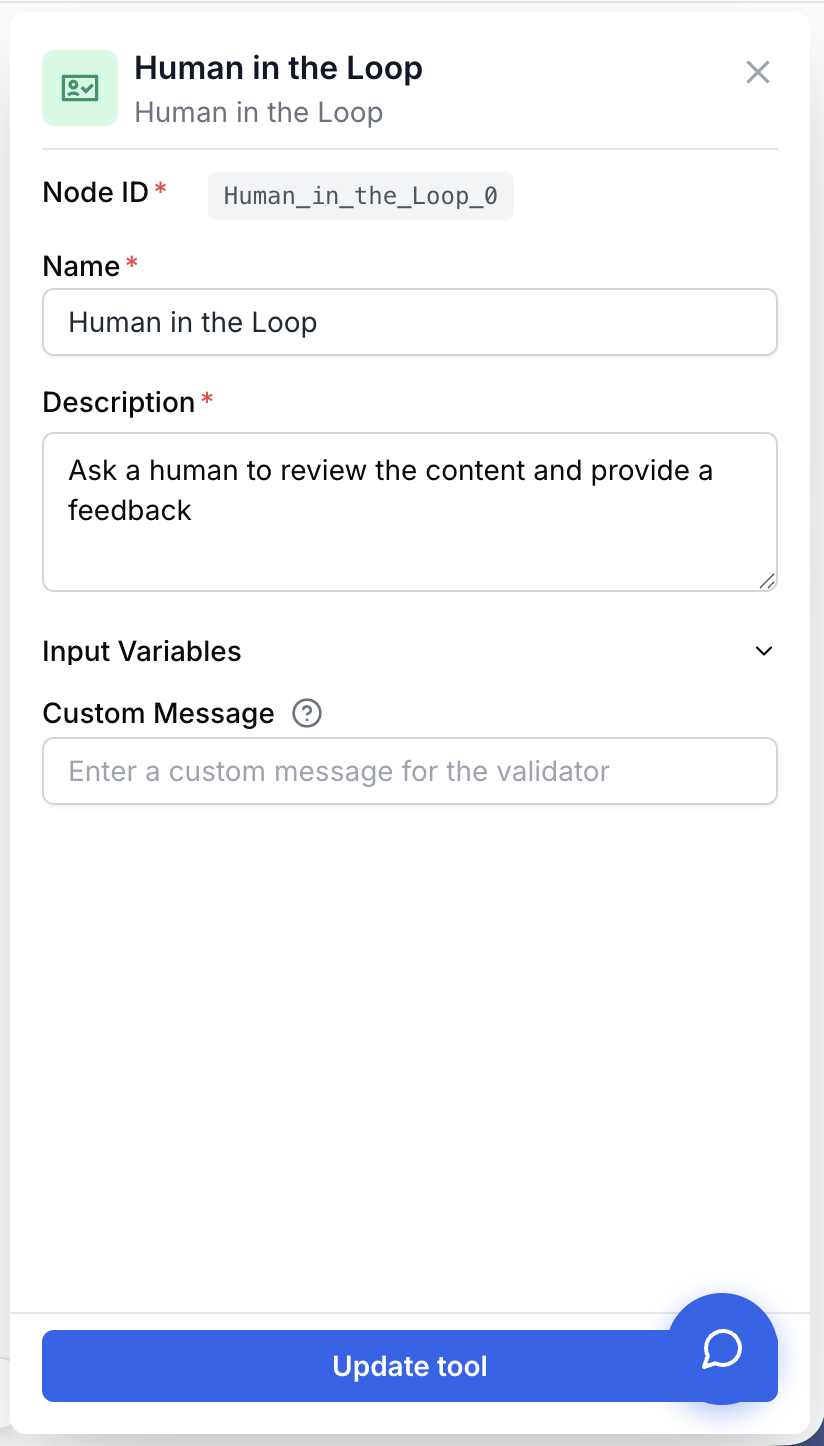
Configuring the node requires connecting the content to review and, optionally, providing a clear instruction for the reviewer.
Required fields
Name string required default: Human in the Loop Node name — Identifies this node in the workflow. Rename it to describe the review step (e.g. “Approve blog post”, “Validate extracted invoice”).
Description string required default: Ask a human to review the content and provide a feedback Node description — A short sentence describing what this review step is for.
Content string required Content to review — The data presented to the reviewer. Connected from an upstream node’s output. Accepts any value the reviewer can read (text, JSON, formatted output).
Optional fields
Custom Message string default: Empty Instruction shown to the reviewer — A free-text message displayed alongside the content to give the reviewer the context and acceptance criteria. Examples: “Review this blog post for accuracy and tone before publishing”, “Verify the extracted data matches the source document”, “Approve this email before it is sent to the client”.
The more specific your custom message, the faster and more reliable the review. Mention the exact fields, tone, or facts to check rather than asking for a generic “review”.
What does the node output?
The node outputs the content as approved by the reviewer. The workflow stays paused until a human acts on the review request, then execution continues with that content as the next node’s input.
How to use the output
In Draft & Goal, you don’t need to look up a complex system-generated variable name. To use the result:
- Draw a connection from the Human in the Loop node’s
Outputport. - Connect it to the next node’s input.
- In that next node, create and name your own variable (for example,
approved_content). The reviewed value will be injected into it automatically.
Output string The content as approved by the human reviewer. Returned only once the review request has been validated; until then the workflow stays paused on this node.
Usage examples
Example 1: Approve an AI-generated article before publishing to Notion
Make sure an LLM-generated article is accurate and on-brand before it lands on your CMS.
Workflow:
- Web Scraper — Fetch a source page used as raw material.
- LLM — Generate a structured article from that source.
- Human in the Loop —
Contentconnected to the LLM output.Custom Message= “Review this article for factual accuracy, tone, and completeness before publishing to Notion”. - Notion Database Writer — Receives the approved article and publishes it.
Example 2: Validate a personalized email before it is sent
Catch wrong customer names, broken offers, or off-brand tone before an automated email goes out.
Workflow:
- LLM — Generate a personalized email from CRM data.
- Human in the Loop —
Contentconnected to the email body.Custom Message= “Check the customer name, offer details, and that the tone is professional. Reject if anything looks wrong”. - Email Sender — Sends the approved email.
Common issues
The workflow is stuck on the Human in the Loop node
Cause: The node is doing exactly its job — it pauses the workflow and waits for a human to validate the review request. There is no automatic timeout.
Solution: Open the workflow execution panel and look for a pending review request on this node. The reviewer must read the content and approve it for the workflow to resume.
The reviewer doesn't know what to check
Cause: The Custom Message field is empty or too vague, so the reviewer only sees raw content with no acceptance criteria.
Solution: Fill Custom Message with a precise instruction that lists what the reviewer must verify (specific fields, tone, facts, formatting). The clearer the message, the faster and more consistent the review.
No content reaches the reviewer
Cause: The Content input is not connected, or the upstream node produced an empty output.
Solution: Verify the Content port is connected to the correct upstream node. Run the upstream node alone to confirm it produces non-empty output before reconnecting.
Best practices and pitfalls
Place a Human in the Loop node just before any irreversible action — sending emails, writing to databases, publishing to a CMS, updating a CRM. A 30-second human check is much cheaper than rolling back a bad write to production.
A workflow paused on this node consumes a slot until it is approved. If you fan out many parallel reviews (e.g. inside a Loop), you can saturate review queues and stall the whole pipeline. Batch reviews when possible, and split independent decisions into separate Human in the Loop nodes so reviewers can approve them one by one.
How does it fit into a workflow?
Human in the Loop typically acts as an approval gate between content generation and any irreversible downstream action. Here’s a typical integration pattern for AI-generated content that ends up in an external system:
graph LR
    Source[Web Scraper / Data source] --> LLM[LLM generates content]
    LLM --> HITL[Human in the Loop
<br/>reviewer approves]
    HITL --> Publish[Notion / Email / CRM writer]
Related nodes
Generate the content that the human reviewer will validate before it is used downstream.
Branch the workflow based on the content that comes out of the review.
Send the approved content as an email only after the reviewer has validated it.
Pair with Human in the Loop to explicitly stop a workflow when a reviewer rejects the content.