Fasterize Data Storage
The Fasterize Data Storage node uploads key-value JSON data to a Fasterize edge dataset for dynamic data management at the CDN level.
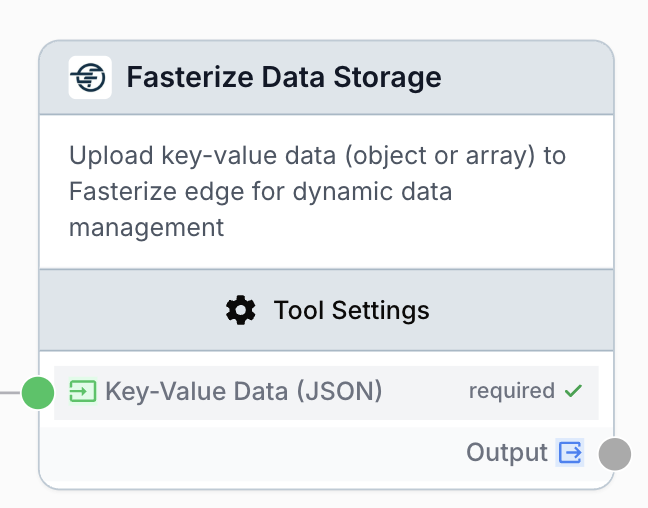
What does the Fasterize Data Storage node do?
The Fasterize Data Storage node uploads key-value JSON data (object or array) to a Fasterize edge dataset. Once stored, the data is served from the Fasterize CDN and can be consumed by edge rules to drive dynamic behaviors such as A/B testing, personalization, redirects, or feature flags without redeploying your site.
Common use cases:
- Pushing per-URL SEO metadata (titles, descriptions) computed by an upstream LLM workflow into a Fasterize dataset to override at the edge.
- Synchronizing a list of URL rewrites or redirects produced by a scraping or sitemap workflow.
- Storing personalization keys (segment, variant, locale) consumed by Fasterize edge rules.
- Maintaining a feature-flag map managed by a Draft & Goal workflow rather than a manual deploy.
Quick setup
Connect your Fasterize integration
Open the node settings and select your Fasterize integration from the dropdown. If it is missing, go to Settings > Integrations to add a Fasterize connection first.
Provide a Dataset ID
Enter the Dataset ID of the Fasterize dataset that will receive the data. The dataset must already exist on the Fasterize side.
Connect the JSON input
Connect an upstream node to the Key-Value Data (JSON) input. The value must be a JSON object ({"key":"val"}) or a JSON array of objects ([{"url":"https://...","prop":"val"}]).
Connect the output
Connect the output port to the next node to forward the API response (status, stored payload echo) for logging or further processing.
Configuration parameters
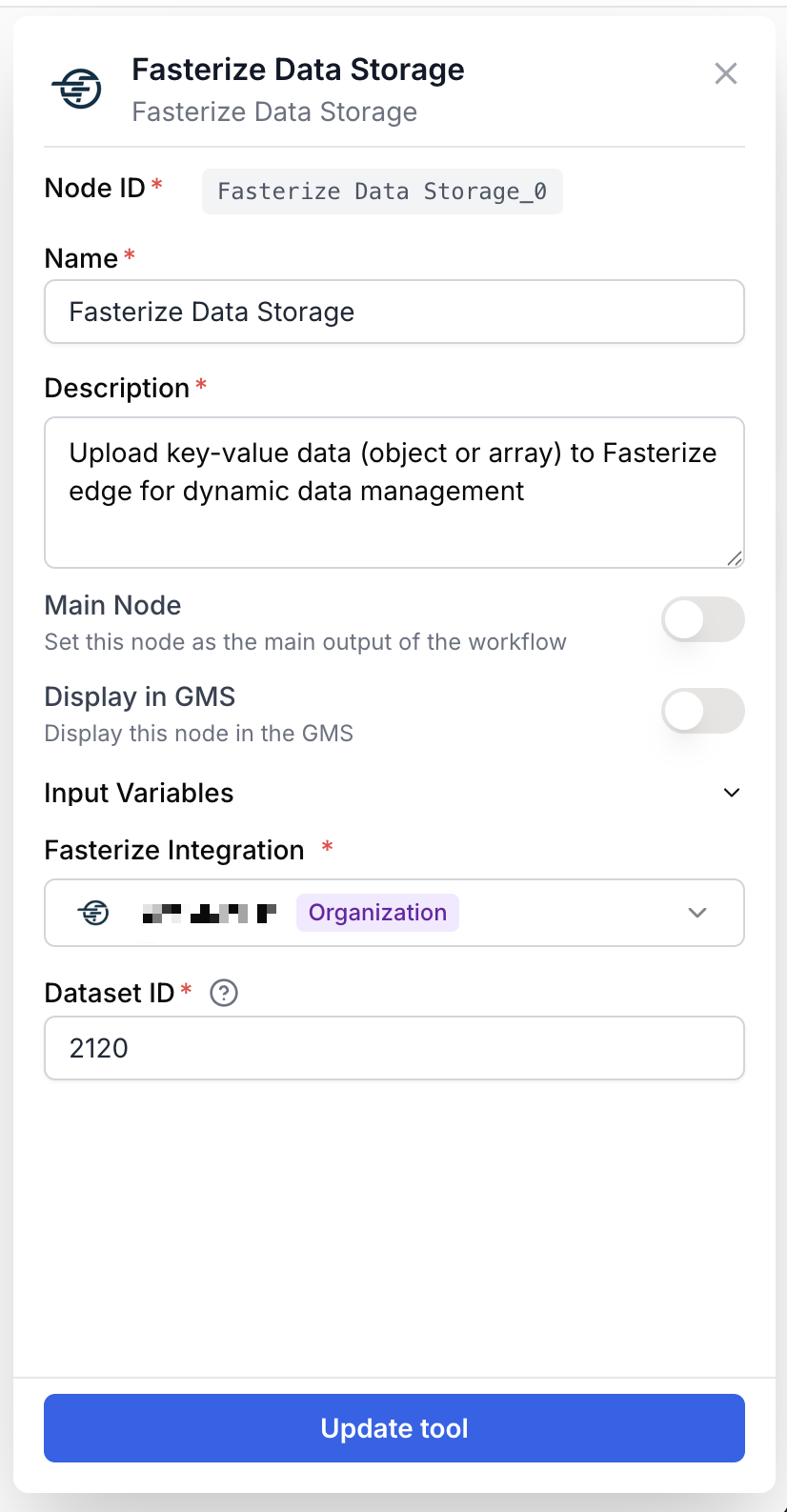
Required fields
integration_id integration required Fasterize integration — Select the Fasterize connection to use. The runner sends the request on behalf of this integration.
dataset_id string required Dataset ID — Identifier of the Fasterize dataset where the key-value data will be written. Can also be provided dynamically through the dataset_id input from an upstream node, which takes priority over the static parameter when both are set.
key_value_data string required Key-Value Data (JSON) — The JSON payload to upload. Accepts a JSON object or an array of objects. Provided as an input from an upstream node; can also be set as a static parameter.
When the upstream node already produces a JSON object directly (not a stringified version), the runner detects it and serializes it for you before sending it to Fasterize.
What does the node output?
The node returns the response payload from the Fasterize Data Storage API as a string, typically the stored data echo or a status confirmation.
output string Raw response returned by the Fasterize Data Storage service after the upload completes.
Usage examples
Example 1: Push LLM-generated SEO titles to the edge
You generate optimized <title> tags for a list of URLs with an LLM workflow and want Fasterize to inject them at the edge.
Input (from an upstream node):
[
  { "url": "https://example.com/blog/seo-2025", "title": "SEO in 2025: a practical guide" },
  { "url": "https://example.com/blog/edge-personalization", "title": "Edge personalization explained" }
]
Configuration:
- Fasterize integration: your Fasterize connection
- Dataset ID:
seo_titles_v1 - Key-Value Data (JSON): connected to the LLM/JSON Path Extractor output
The Fasterize edge then reads seo_titles_v1 and rewrites the title tag per URL.
Example 2: Update a feature-flag map from a workflow
You manage a small set of feature flags through a workflow that resolves variants based on a date or audience.
Input:
{
  "homepage_hero_variant": "B",
  "checkout_express_enabled": true,
  "promo_banner": "spring_sale_2025"
}
Configuration:
- Dataset ID:
feature_flags - Key-Value Data (JSON): from a previous LLM or Conditional node that builds the object
Common issues
Error: Dataset ID is required for data storage
Cause: The dataset_id parameter is empty and no dataset_id input is connected.
Solution: Set a static Dataset ID in the settings or connect an upstream node providing a dataset_id value.
Error: No key-value data provided for storage
Cause: The key_value_data input was empty or resolved to {}.
Solution: Make sure the upstream node actually produces a non-empty JSON object or array, and that the connection is wired to the Key-Value Data (JSON) input.
Error: Invalid JSON format for key-value data
Cause: The string passed to key_value_data is not valid JSON (trailing commas, single quotes, unescaped characters).
Solution: Validate the payload before this node, typically with a Find and Replace step to clean Markdown fences or with a JSON Path Extractor to isolate the right fragment.
Error: Key-value data must be a JSON object
Cause: The parsed JSON is a primitive (string, number, boolean, null) rather than an object or array of objects.
Solution: Wrap the value in an object, for example {"value": "..."}, or build an array of objects upstream.
Best practices
Keep one Dataset ID per logical concern (titles, redirects, flags). Mixing unrelated keys in the same dataset makes edge rules harder to reason about.
Each run overwrites the dataset with the payload you send. If you only want to update part of it, fetch the current state first, merge, then send the full result.
Related nodes
Push large lists of URL rewrites and redirects to Fasterize in one operation.
Apply SEO recommendations at scale through the Fasterize edge.
Extract the exact JSON fragment to upload from a larger upstream payload.
Generate the values (titles, descriptions, variants) you then store in a Fasterize dataset.