Paragraph
The Paragraph node creates a multi-line text input field that users fill in when launching the workflow, ideal for longer content like articles, descriptions, or detailed instructions.
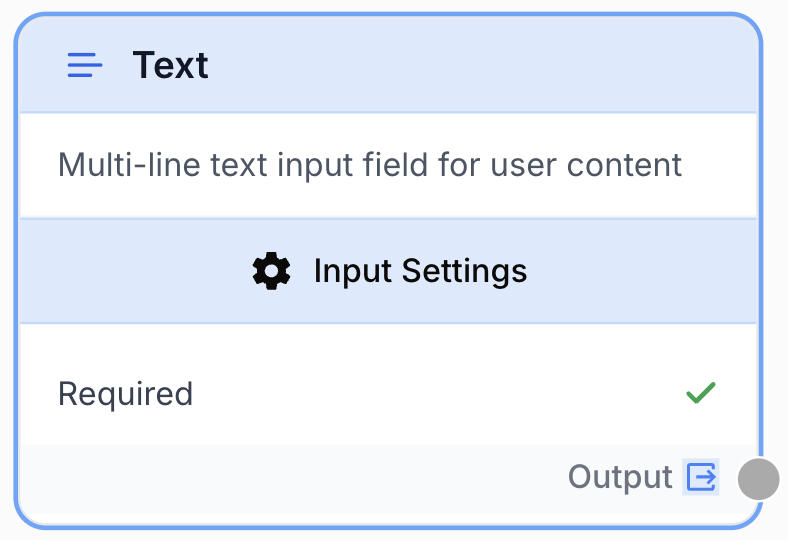
What does the Paragraph node do?
The Paragraph node is a workflow input node that exposes a multi-line textarea to whoever launches the workflow. Unlike the Short Text input, it is sized for long-form content: articles, briefs, transcripts, raw user feedback, or detailed instructions that span several lines or paragraphs.
It has no input port and produces a single string output that downstream nodes can consume directly.
Common use cases:
- Capturing a long content brief before passing it to an LLM for generation or rewriting.
- Collecting raw articles or transcripts to be analyzed, summarized, or translated.
- Letting an end user paste structured prompts, JSON snippets, or HTML blocks into a workflow run.
- Pre-filling a default paragraph that the user can edit at run time.
Quick setup
Follow these steps to add and configure the Paragraph node in your workflow:
Add the node to the canvas
Open the Node Library, go to the Inputs section, then drag and drop the Paragraph node onto your workspace. The node has no input port — it is a workflow entry point.
Mark the field as required or optional
Open the node settings. Toggle Required off if you want to allow workflow runs without filling the paragraph; leave it on (default) to block execution until the user provides text.
(Optional) Provide a default value
Expand the additional parameters and fill Default Value with the text you want pre-loaded into the textarea at run time. The user can still overwrite it before launching the workflow.
Connect the output
Connect the output port (on the right of the node) to the input of the next node (LLM, Web Scraper, Find and Replace, etc.). In the receiving node, name the variable that will hold the paragraph text.
Configuration parameters
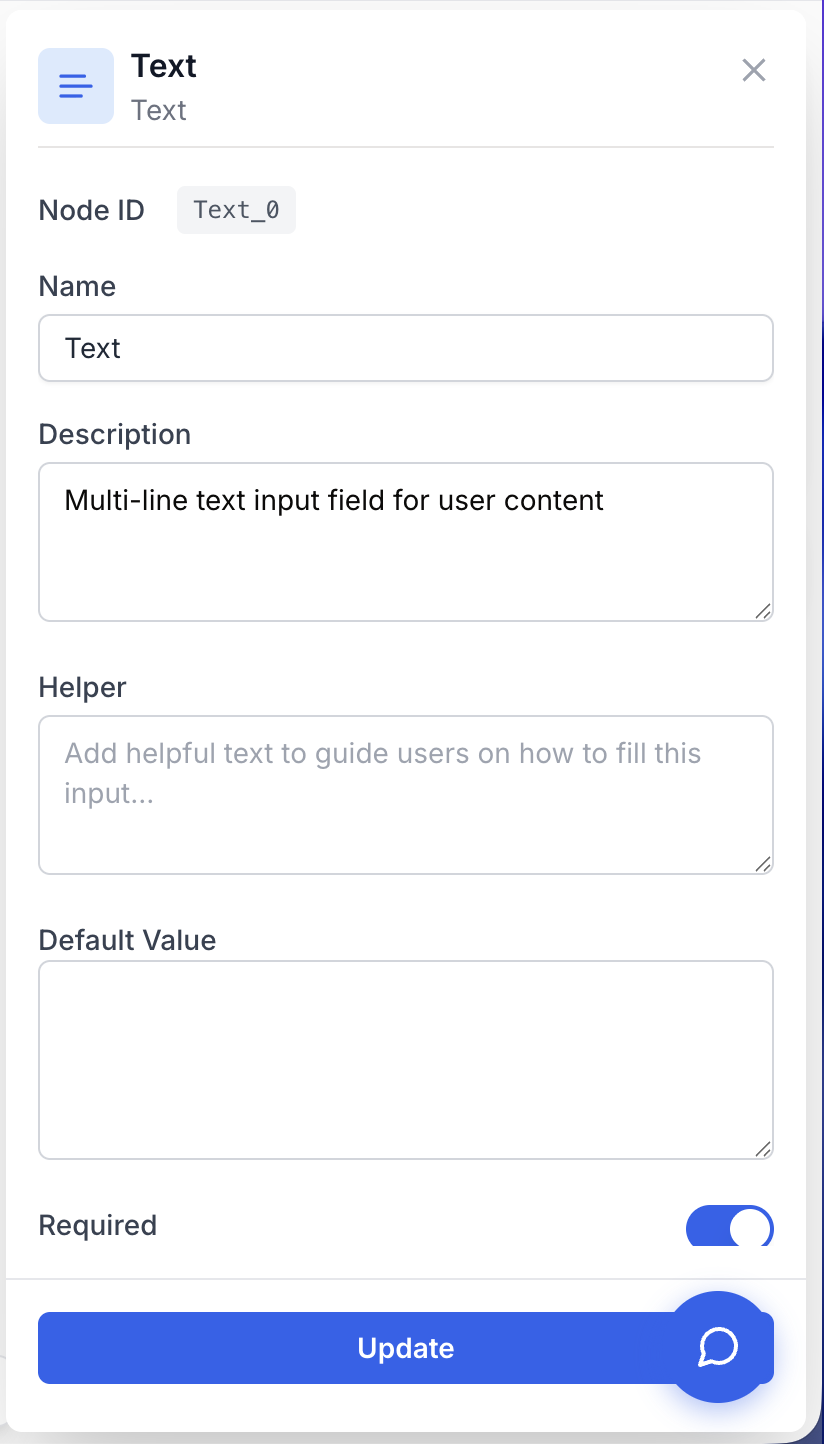
Configuring the node consists of telling Draft & Goal whether the paragraph is mandatory and, optionally, what default text to pre-fill.
Required fields
Name string required default: Text Node name — Identifies the node in the workflow run and in variable references. Rename it (for example, article_brief or user_feedback) so downstream nodes pull from a meaningful key.
Description string required default: Multi-line text input field for user content Node description — Short sentence explaining what content this paragraph is supposed to receive. Helps collaborators understand the workflow at a glance.
Required boolean required default: true Required field — When true, the workflow refuses to launch until the user fills the paragraph. When false, the run can proceed with an empty string.
Optional fields
Default Value string default: (empty) Pre-filled text — Text loaded into the textarea before the user starts editing. Useful for templates, example prompts, or boilerplate the user only needs to tweak. Leave empty for a blank field.
If you need a single-line input (a title, a URL, a keyword) use the Short Text input instead — it renders a one-line field and supports a multi-text mode for arrays of short strings.
What does the node output?
The Paragraph node outputs a single string containing exactly what the user typed in the textarea (or the default value if the field was left untouched and not required). No trimming, no formatting, no transformation is applied.
How to use the output
In Draft & Goal, you don’t reference a fixed variable name. To consume the output:
- Draw a connection from the Paragraph node’s output port.
- Connect it to the next node’s input port.
- In that next node, create and name your own variable (for example,
article_text). The paragraph content is injected into it automatically at run time.
output string The full text typed by the user in the textarea, returned verbatim. Empty string if Required is off and the user submitted nothing.
Usage examples
Example 1: Article rewriting workflow
Capture a long article from the user and pass it to an LLM for a tone-of-voice rewrite.
Setup:
- Paragraph node renamed to
source_article,Required=true, no default value. - Output connected to an LLM node that exposes the variable
article_text.
Run-time input (typed by the user):
Search engine optimization in 2026 is no longer about keyword density.
Modern SEO blends entity-based content modeling, technical health, and
intent-aligned UX signals into a single coherent strategy...
Downstream LLM prompt template:
Rewrite the following article in a friendly, conversational tone while
preserving every fact and structural heading:

{{article_text}}
Example 2: Optional feedback paragraph with a default value
Collect user feedback at the end of a workflow run, with a hint pre-loaded so the user knows what to write.
Setup:
- Paragraph node renamed to
user_feedback. Required=false(user can skip).Default Value=Tell us what worked and what didn't in 2-3 sentences.
Behavior:
- If the user clears the textarea and launches the workflow,
outputis an empty string and downstream branches handle the skip case. - If the user types a real message,
outputcontains that message verbatim and a downstream Conditional node routes it to a sentiment analyzer.
Common issues
The workflow won't launch — the Paragraph field shows a red error
Cause: The Required flag is on (default) and the user left the textarea empty.
Solution: Either fill the field at run time, or open the node settings and set Required to false if the paragraph is genuinely optional.
The downstream node receives a single line instead of the multi-line text I typed
Cause: The downstream node (LLM prompt, code block, etc.) is collapsing newlines because the variable was inserted in a single-line context (for example, a URL field or a CSV cell).
Solution: Insert {{your_variable}} inside a multi-line context — a Markdown block, a textarea, or a triple-quoted string — so newlines are preserved end to end.
My default value isn't showing up at run time
Cause: Default Value lives under the Additional parameters section. If it’s collapsed in the settings panel, it’s easy to miss that the field is empty.
Solution: Open the additional parameters in the node settings, type the default text, save the workflow, and re-open the run modal — the textarea is now pre-filled.
Best practices and pitfalls
Rename the node to match the semantic role of the content (source_article, meeting_notes, support_ticket_body) so downstream variables read naturally and the workflow stays self-documenting.
Don’t use Paragraph for short, one-line values. A Paragraph for a single keyword or a single URL invites the user to paste extra whitespace or accidental newlines that break downstream parsing. Use Short Text or Url for those cases.
How does it fit into a workflow?
The Paragraph node is a workflow entry point — it sits at the start of the graph and feeds long-form text into the rest of the pipeline.
graph LR
    P[Paragraph: source_article] --> Clean[Find and Replace]
    Clean --> LLM[LLM rewrite]
    LLM --> Out[Google Docs Writer]
Related nodes
Single-line input — use for titles, keywords, or any value that should fit on one line.
Most common downstream consumer — the LLM rewrites, summarizes, or analyzes the paragraph.
Useful right after a Paragraph to strip unwanted characters or normalize whitespace before the text reaches an LLM.
Sibling input node for URL values — pair with Paragraph when your workflow needs both a target URL and a content brief.