AI Agent
The AI Agent node runs an autonomous LLM that can plan, call tools, query knowledge bases, and use MCP servers to complete multi-step tasks.
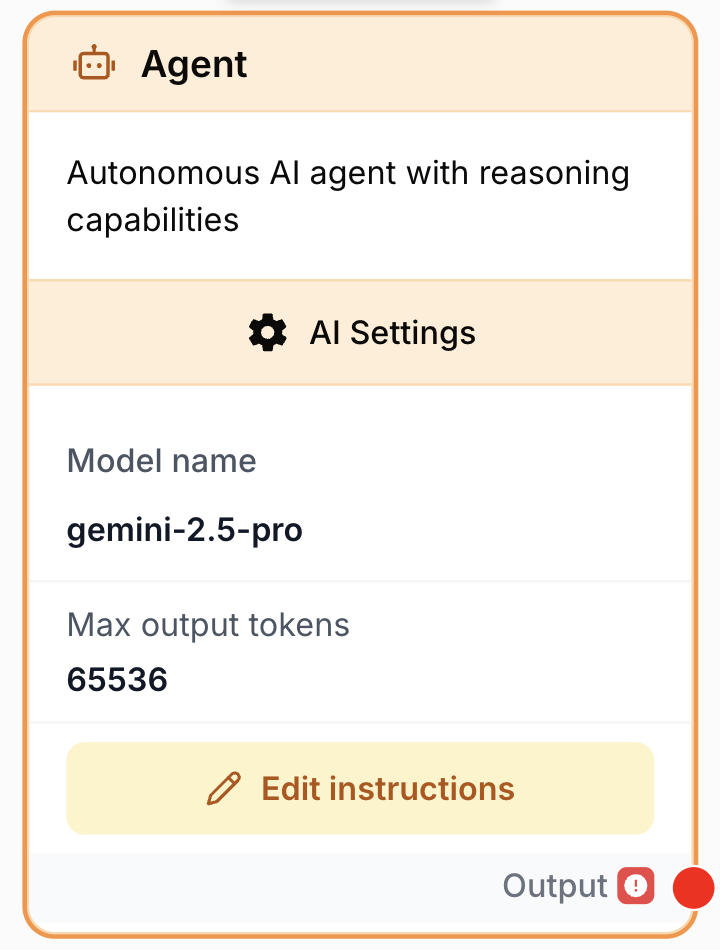
What does the AI Agent node do?
The AI Agent node turns an LLM into an autonomous executor. Unlike the LLM node — which produces a single response from a prompt — the Agent reasons over your instructions, decides which tools, datasources, or MCP servers to invoke, observes the results, and iterates until the goal is reached. It returns a single text answer once it considers the task complete.
Common use cases:
- Multi-step research that combines web search, scraping, and summarization in one node.
- Question-answering grounded in a private knowledge base via RAG (datasources).
- Driving external systems through MCP servers (e.g. internal APIs, databases) without writing dedicated nodes.
- Data enrichment workflows that mix document context, web tools, and structured reasoning.
Quick setup
Follow these steps to add and configure the AI Agent node in your workflow:
Add the node to the canvas
Open the Node Library, go to AI and drag the Agent node onto your workspace.
Pick a model
In the settings, choose an LLM in the Model name dropdown. Reasoning-capable models (GPT-4 class, Claude Sonnet/Opus class, Gemini Pro) are strongly recommended — weaker models loop or fail to use tools correctly.
Write the instructions
In the prompt field, describe the goal, expected steps, constraints, and output format. Use {{variable}} syntax to inject values from upstream nodes.
Attach capabilities
Add any combination of Tools (built-in agent tools), RAG datasources, and MCP Servers. The agent decides at runtime when to use each one.
Connect the output
Connect the output port to the next node and define the receiving variable name there to consume the agent’s final answer.
Configuration parameters
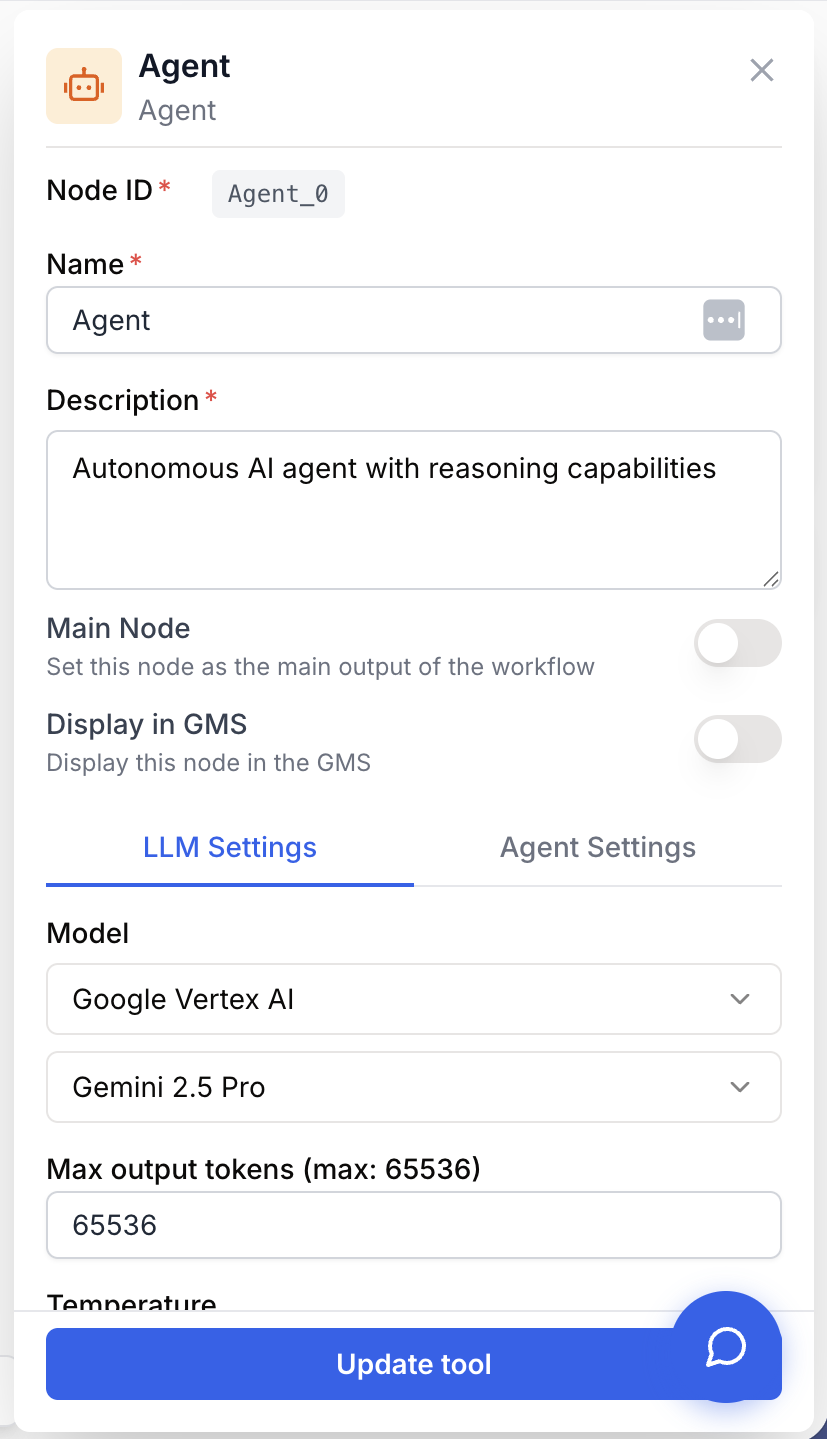
Configuring the node means picking a model, writing clear instructions, and exposing the right capabilities — nothing else is mandatory.
Required fields
Name string required default: Agent Node name — Used to identify the node when running and debugging the workflow (e.g. “Lead enrichment agent”).
Description string required default: A tool for interacting with a Large Language Model in Agent mode. Node description — Short phrase describing what this agent is responsible for in your workflow.
Model name llm required LLM to drive the agent — Selects the model and its provider. The agent inherits the provider’s Max output tokens ceiling. Reasoning-capable models perform far better in agent mode.
prompt string required Instructions — The task and goal the agent must accomplish. Supports dynamic variables {{myVariable}} (allowed characters: -, _, .). The node fails configuration validation if this field is empty.
Optional fields
System Message string agentSystemMessage — Optional system-level instructions that frame the agent’s persona, role, and global rules. Applied before the user prompt at every step of the agent loop.
Tools array default: [] agentTools — Built-in tools the agent can call (e.g. web search, scraping, internal helpers). The agent decides when and how often to invoke each one.
RAG array default: [] agentDatasources — Knowledge bases or document collections the agent can query for grounded answers. Useful for question-answering against your own content.
MCP Servers array default: [] agentMcpServers — MCP servers the agent can talk to. Each server exposes its own toolset, letting you plug in custom integrations without building dedicated nodes.
Temperature number default: 1 Sampling temperature. Lower values (0.2–0.5) make tool selection and reasoning more deterministic; higher values increase variability.
Max output tokens number default: 4000 Upper bound on tokens for the final answer. Minimum is 4000. Increase if the agent’s answers are getting cut off.
Top K number default: 40 Restricts sampling to the K most likely tokens at each step.
Top P number default: 1.0 Nucleus sampling: keep the smallest set of tokens whose cumulative probability is ≥ P. Range 0–1.
Thinking Level string Effort level for reasoning models that expose a thinking control (e.g. low, medium, high). Leave empty for models that don’t support it.
Thinking Budget number Maximum tokens the model may spend in its thinking phase, for models that expose a budget.
LLM Provider string Auto-populated from the selected model. Identifies the provider routing (OpenAI, Anthropic, Google, etc.).
Combine System Message + prompt: put stable role/policy in the system message and put the per-run task (with {{variables}}) in the prompt. This gives consistent behaviour across runs without rewriting the whole instruction block.
What does the node output?
The node outputs the agent’s final text answer as a string — once it decides the task is complete. Tool calls, intermediate reasoning, and observations are not part of the output: only the answer.
How to use the output
In Draft & Goal you don’t need to look up a system-generated variable name. To use the result:
- Draw a connection from the AI Agent node’s output.
- Connect it to the next node’s input.
- In that next node, create and name your own variable (e.g.
agent_answer). The agent’s final response is injected into it automatically.
output string The agent’s final response after the reasoning loop terminates. If you need structured data, instruct the agent in the prompt to format the answer as JSON and parse it downstream with a JSON Path Extractor.
Usage examples
Example 1: Grounded Q&A over a private knowledge base
You want the agent to answer support questions strictly from your documentation.
Configuration:
- Model name: a reasoning-capable LLM (e.g. GPT-4 class).
- System Message:
You are a support assistant. Only answer using information from the
attached knowledge base. If the answer is not in the sources, say
"I don't know based on the available documentation."- prompt:
Question from the customer: {{customer_question}}

Search the knowledge base, then provide:
- A concise answer (max 4 sentences)
- The 1-3 most relevant source titles you used- RAG: select your “Product docs” datasource.
- Tools / MCP Servers: none — the agent must rely on RAG only.
Example 2: Multi-step research with tools and MCP
You want the agent to enrich a lead by combining web tools and an internal CRM exposed via MCP.
Configuration:
- prompt:
Enrich the lead {{lead_email}}:
1. Use the web search tool to find the company website from the email domain.
2. Scrape the homepage and "About" page to extract industry, size, and value proposition.
3. Call the CRM MCP server to check whether this account already exists.
4. Return a JSON object with keys: company_name, website, industry, size_estimate, exists_in_crm, summary.

Use at most 8 tool calls. If a step fails, continue with whatever information you have.- Tools: Web Search, Web Scraper.
- MCP Servers: your internal CRM server.
- Temperature:
0.3for reproducible tool selection.
Common issues
The node fails validation with 'Agent requires instructions to be configured'
Cause: The prompt field is empty or whitespace-only.
Solution: Open the node settings and fill in the prompt field with the task to perform. The validator strips whitespace, so a single space is not enough.
The agent loops, retries the same tool, or never terminates
Cause: The instructions don’t define a clear stopping condition, or the model is too weak to plan reliably.
Solution: Add an explicit budget in the prompt (“Use at most N tool calls”, “If you cannot find X, say so and stop”). Switch to a stronger reasoning model. Lower Temperature to 0.2–0.4.
The final answer is truncated
Cause: Max output tokens is too low for the requested format, or the agent spent its budget on intermediate reasoning.
Solution: Increase Max output tokens. Ask the agent in the prompt to produce a shorter, more structured answer. For reasoning models, also raise Thinking Budget if the truncation happens during thinking.
Connecting a File input fails with a file-type error
Cause: The Agent node only accepts Structured Documents (csv, xlsx, json, xml) and Unstructured Documents (pdf, txt, md, docx, pptx) coming from a File input node. Other file types are rejected at connection time.
Solution: Change the File node’s type to a supported document type, or pre-process the file with a converter node before feeding it into the agent.
The agent ignores my datasources or MCP servers
Cause: The instructions don’t mention them, so the agent doesn’t realize they’re available — or it judged them irrelevant for the current task.
Solution: Reference the capability explicitly in the prompt (“Use the knowledge base to answer”, “Call the CRM MCP server to verify the account”). Provide the datasource name in the system message.
Best practices and pitfalls
Treat the prompt as a contract: state the goal, the allowed tools, the iteration budget, and the exact output format. Concrete contracts produce concrete answers; vague prompts produce drifting agents.
Don’t enable every capability “just in case”. Each extra tool, datasource, and MCP server widens the action space the agent must reason over — slower runs, more loops, higher token cost. Attach only what the task strictly needs.
How does it fit into a workflow?
The AI Agent typically replaces a chain of LLM + tool nodes when reasoning between steps is required. Here’s a typical integration pattern for a research-then-act workflow:
graph LR
    Input[Text Input
<br/>topic or lead] --> Agent[AI Agent
<br/>plans + uses tools/RAG/MCP]
    Agent --> FR[Find and Replace
<br/>strip Markdown fences]
    FR --> Extractor[JSON Path Extractor]
    Extractor --> Writer[Google Docs Writer]
Related nodes
Use a plain LLM call when the task is single-shot text generation with no tools.
Direct alternative when you need scraped content without agent reasoning, or to feed the agent’s tool set.
Place after the Agent when you instruct it to return JSON, to extract structured fields downstream.
Clean up Markdown fences or stray characters in the agent’s final answer before parsing.