Google Search Console
The Google Search Console node fetches search performance data — queries, clicks, impressions, CTR and position — broken down by the dimensions you choose.
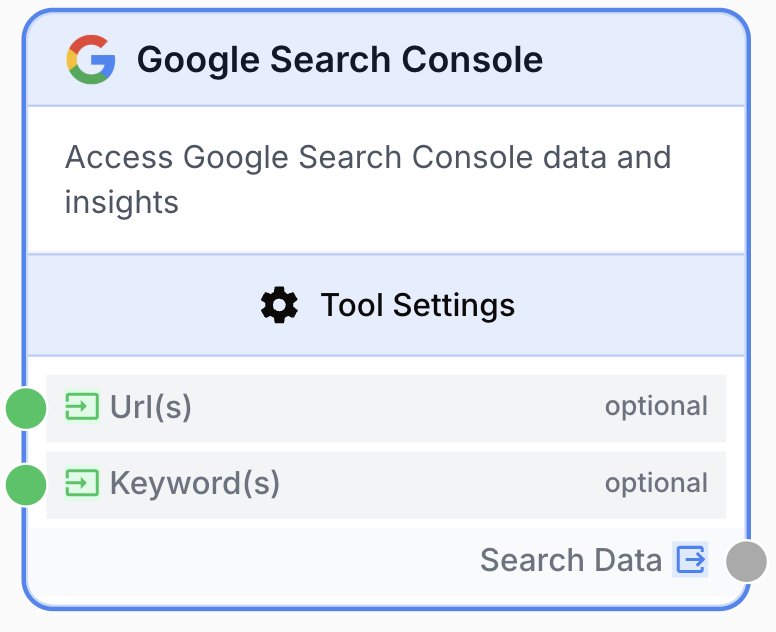
What does the Google Search Console node do?
The Google Search Console node connects to a verified GSC property and pulls search performance metrics — clicks, impressions, CTR and average position — grouped by the dimensions you choose (query, page, country, device, date). You can filter by URLs or keywords, pick a predefined or custom date range, sort, and cap the result size.
Common use cases:
- Track keyword rankings over time and feed the data to an LLM to summarize movement.
- Spot content opportunities by surfacing low-position queries with high impressions.
- Monitor CTR drops on specific pages after a redesign or content update.
- Build SEO performance dashboards by exporting GSC data into BigQuery, Google Sheets or a database.
- Run batch flows over many properties by externalizing the integration and Site URL via input variables.
Quick setup
Connect a Google account
Open Settings > Integrations, add a Google connection, and grant Search Console scope. The same connection is reused for every Google Search Console node in your workspace.
Add the node to the canvas
In the Node Library, go to Integrations > Google > Search Console and drag the node onto the canvas.
Pick the property and date range
In the node settings, select the Google Integration, then pick a verified Site URL (Property) from the searchable dropdown. Choose a Date Range (e.g. last_28_days) or personalized to set explicit start/end dates.
Choose dimensions and sorting
Select one or more Dimensions (query, page, country, device, date). Optionally set a Sort column (clicks, impressions, ctr, position) and Sort order. Cap output with Row limit (1 to 25 000).
Connect inputs and output
Connect either a Url(s) or Keyword(s) input (not both — they are mutually exclusive). Connect the output port to a downstream node. Define a variable name in that next node to consume the JSON payload.
Configuration parameters
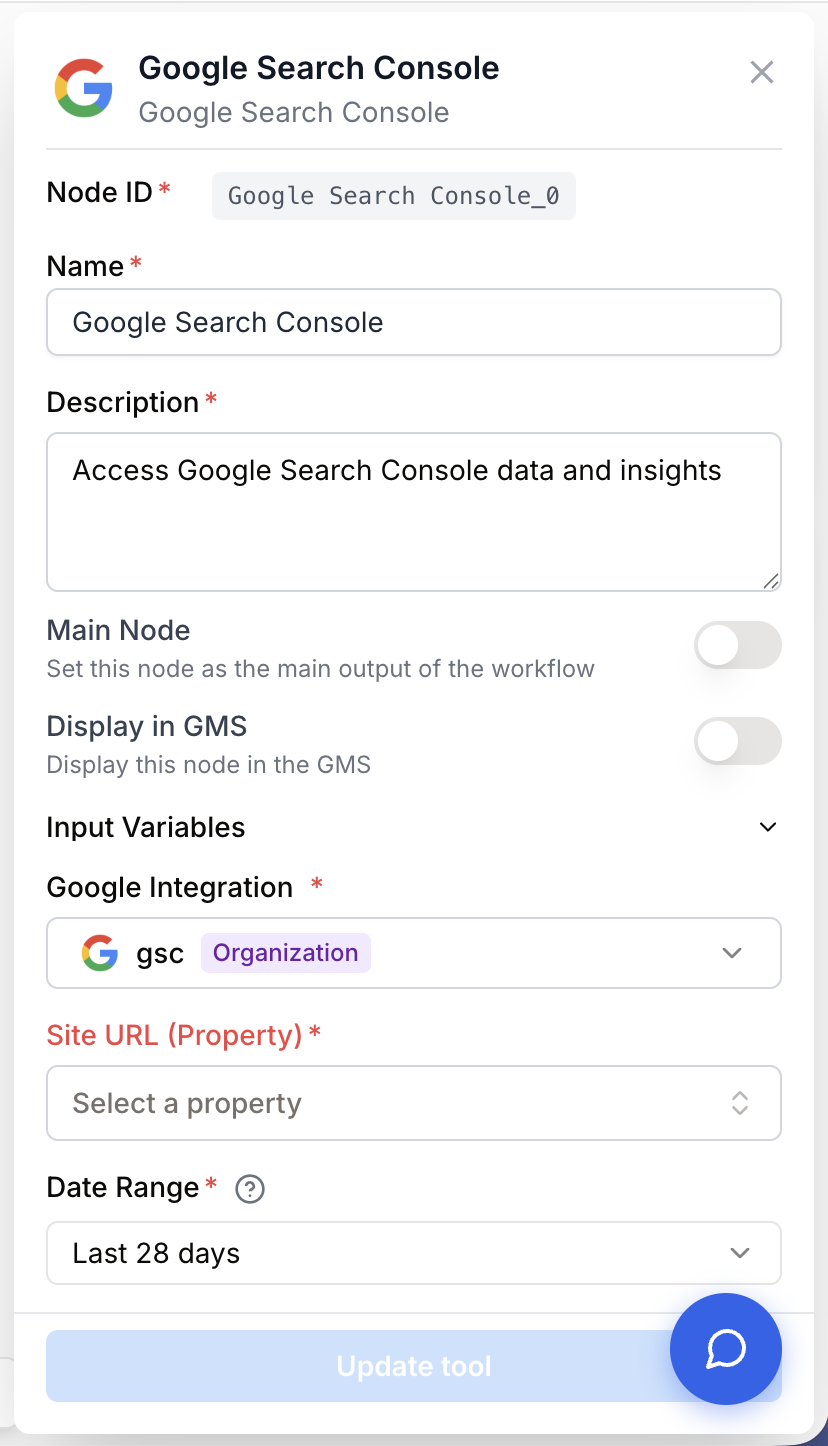
Required fields
integration_id integration required Google Integration — Google connection used to authenticate the API call. Pick inline or externalize with Use a variable for integration (provided by an upstream integration_id input).
site_url string required Site URL (Property) — Verified GSC property. Either a domain property (sc-domain:example.com) or a URL-prefix property (https://example.com/). Pick from the dropdown loaded from your integration, or externalize with Use variable (provided by an upstream site_url input).
date_range string required default: last_28_days Date Range — Predefined window. One of: last_available_day, last_7_days, last_28_days, last_3_months, last_6_months, last_12_months, last_16_months, personalized. GSC data is available from today minus 2 days; recent data may not be accessible due to API processing delays.
dimensions array required default: query,page Dimensions — One or more of: query, page, country, device, date. Each row in the response is keyed by the chosen dimension combination.
row_limit number required default: 1000 Row limit — Maximum number of rows returned (1 to 25 000).
sort_order string required default: desc Sort order — asc or desc.
Optional fields
start_date string Start date — Required only when Date Range is personalized. Format YYYY-MM-DD. Can be externalized via Use variable for start date (becomes {{startDate}} and is supplied at runtime by an upstream input).
end_date string End date — Required only when Date Range is personalized. Format YYYY-MM-DD. Must be on or after start_date. Can be externalized via Use variable for end date ({{endDate}}).
sort_column string Sort column — One of: clicks, impressions, ctr, position. If left empty, the node returns rows in the order Google provides them.
url multiline Url(s) — Optional input. One URL per line, or a JSON array string. Filters the report to the listed pages. Mutually exclusive with Keyword(s).
keywords multiline Keyword(s) — Optional input. One keyword per line, or a JSON array string. Filters the report to the listed search queries. Mutually exclusive with Url(s).
use_site_url_variable boolean default: false Use variable (Site URL) — Externalizes the Site URL: the value comes from an upstream input handle instead of being picked in the panel. Auto-forced ON when Use a variable for integration is enabled.
use_integration_variable boolean default: false Use a variable for integration — Externalizes the integration. Forces use_site_url_variable ON because without a concrete integration the GSC properties cannot be loaded in the settings panel. Required for batch flows where an upstream input node provides both integration_id and site_url.
Pair this node with the Google Search Property input node when you need to switch property at runtime or run the same workflow over many properties in batch.
What does the node output?
The node outputs a single string named search_data containing a JSON payload. Each row reflects the chosen dimension combination and the four metrics returned by the GSC API.
{
  "rows": [
    {
      "query": "best seo tools",
      "page": "https://example.com/blog/best-seo-tools",
      "clicks": 150,
      "impressions": 5000,
      "ctr": 0.03,
      "position": 4.2
    },
    {
      "query": "seo strategy",
      "page": "https://example.com/blog/seo-strategy-2025",
      "clicks": 92,
      "impressions": 3100,
      "ctr": 0.0297,
      "position": 6.8
    }
  ]
}
search_data string JSON string containing a rows array. Each row holds the values for the dimensions you selected (e.g. query, page, device, country, date) plus the metrics clicks, impressions, ctr and position.
Usage examples
Example 1: Surface low-position high-impression queries
You want to find queries where your site shows up often but ranks poorly — classic content-opportunity territory.
Configuration:
- Site URL:
sc-domain:example.com - Date Range:
last_28_days - Dimensions:
query - Sort column:
impressions - Sort order:
desc - Row limit:
1000
Pipe search_data into a JSON Path Extractor to keep only rows with position > 10, then feed the filtered list to an LLM node to suggest content updates per query.
Example 2: Track CTR per page after a content refresh
You refreshed a batch of pages and want a per-page CTR comparison over the past 3 months.
Configuration:
- Site URL:
https://example.com/ - Date Range:
last_3_months - Dimensions:
page,date - Sort column:
clicks - Url(s) input: the list of refreshed URLs (one per line)
Connect the output to a Data Analyzer or a database writer node to chart weekly CTR per page.
Example 3: Batch report across many properties
You manage ten properties and want one report per property without duplicating nodes.
Configuration:
- Enable Use a variable for integration (forces Use variable on Site URL).
- Wire the Google Search Property input node into both the
integration_idandsite_urlhandles. - Wrap the GSC node in a Loop node iterating over your property list.
The runner expects a JSON object on the site_url input handle ({output, integration_id}) — it splits the two values automatically. This is the supported batch shape.
Common issues
The Site URL dropdown stays empty after I pick a Google account
Cause: The integration token does not have GSC scope, or the connected account has no verified properties.
Solution: In Settings > Integrations, reconnect the Google account and make sure Search Console scope is granted. Then verify in https://search.google.com/search-console that the account owns at least one verified property.
I get an error: Missing Google Search Console Integration
Cause: The integration was deleted or revoked, or the upstream input node did not supply integration_id when Use a variable for integration is enabled.
Solution: If you are using inline selection, pick a valid integration in the dropdown. If you externalized it, check that the upstream node actually outputs integration_id (or a JSON object containing it).
The node returns zero rows even though my property has traffic
Cause: Your date range is too recent — GSC only exposes data up to today minus two days — or the URL/keyword filter does not match anything in the period.
Solution: Pick last_28_days first to confirm data is reachable, then narrow the range. If you supplied URLs or keywords, drop them temporarily and re-run.
Validation error: You can connect either URLs or Keywords, but not both
Cause: Both the Url(s) and Keyword(s) input handles are wired. The node enforces that they are mutually exclusive.
Solution: Disconnect one of the two inputs. Use Url(s) for page-level filtering, Keyword(s) for query-level filtering.
Personalized date range fails with a date validation error
Cause: start_date is after end_date, or one of them is missing while Date Range is set to personalized.
Solution: Set both fields, ensure start_date <= end_date, and remember the latest valid end_date is two days before today. If you externalize the dates, ensure the upstream inputs supply valid YYYY-MM-DD strings.
Best practices
Pick the smallest dimension set you need. Fewer dimensions mean fewer rows and a faster, cheaper API call. Add date only when you genuinely need a time series.
Cap row_limit to what you will actually consume. Asking for 25 000 rows when you only show the top 200 in your report wastes runtime and downstream LLM tokens.
Never wire both Url(s) and Keyword(s). The node refuses to run with both connected. If you need both filters, run the node twice and Merge the outputs.
Variable mode requires the Search Property input node when you need both integration and site URL externalized. Plain text variables that don’t carry an integration_id will fail with a missing-integration error.
Related nodes
Runtime selector for the GSC property to feed this node — required for batch flows over multiple properties.
Generate insights, summaries or recommendations from the search performance data returned by GSC.
Filter or extract specific rows and fields from the JSON payload before downstream processing.
Iterate over a list of properties or URLs to run the GSC node once per item in batch flows.
Turn the GSC rows into a CSV-ready table for charts, pivots and downstream reporting.