Majestic Top Pages
The Majestic Top Pages node identifies the pages from one or more domains that attract the most backlinks, ranked by SEO metrics from the Majestic index.
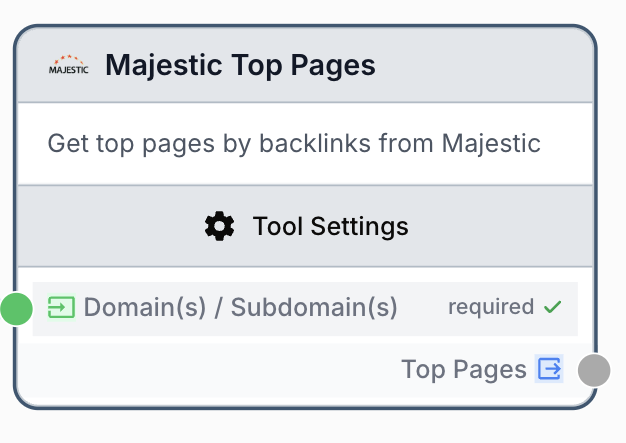
What does the Majestic Top Pages node do?
The Majestic Top Pages node queries the Majestic SEO index to return the pages of a given domain or subdomain that receive the largest number of external backlinks. For each page, it provides key SEO authority signals (Trust Flow, Citation Flow, referring domains) so you can quickly identify the strongest assets of a website.
Common use cases:
- Auditing a competitor to see which pages drive most of their off-site authority.
- Building a target list of high-authority URLs for outreach or content benchmarking.
- Monitoring your own domain to detect newly powerful pages and prioritize internal linking.
Quick setup
Follow these steps to add and configure the Majestic Top Pages node in your workflow.
Connect a Majestic integration
Open Settings > Integrations and connect your Majestic account using your API key. The node cannot run without a configured integration.
Add the node to the canvas
Open the Node Library, go to Integrations > SEO Tools > Majestic, then drag and drop the Majestic Top Pages node onto your workspace.
Provide the queries
Type one domain or subdomain per line in the Domain(s) / Subdomain(s) input, or connect a previous node that outputs a list of domains.
Pick the data source and count
Choose between Fresh Index (last 90 days) and Historic Index (full history), then set how many pages you want to retrieve per domain (1 to 1000).
Connect the output
Connect the Top Pages output to the next node (for example a JSON Path Extractor or an LLM) and create a variable name there to consume the result.
Configuration parameters
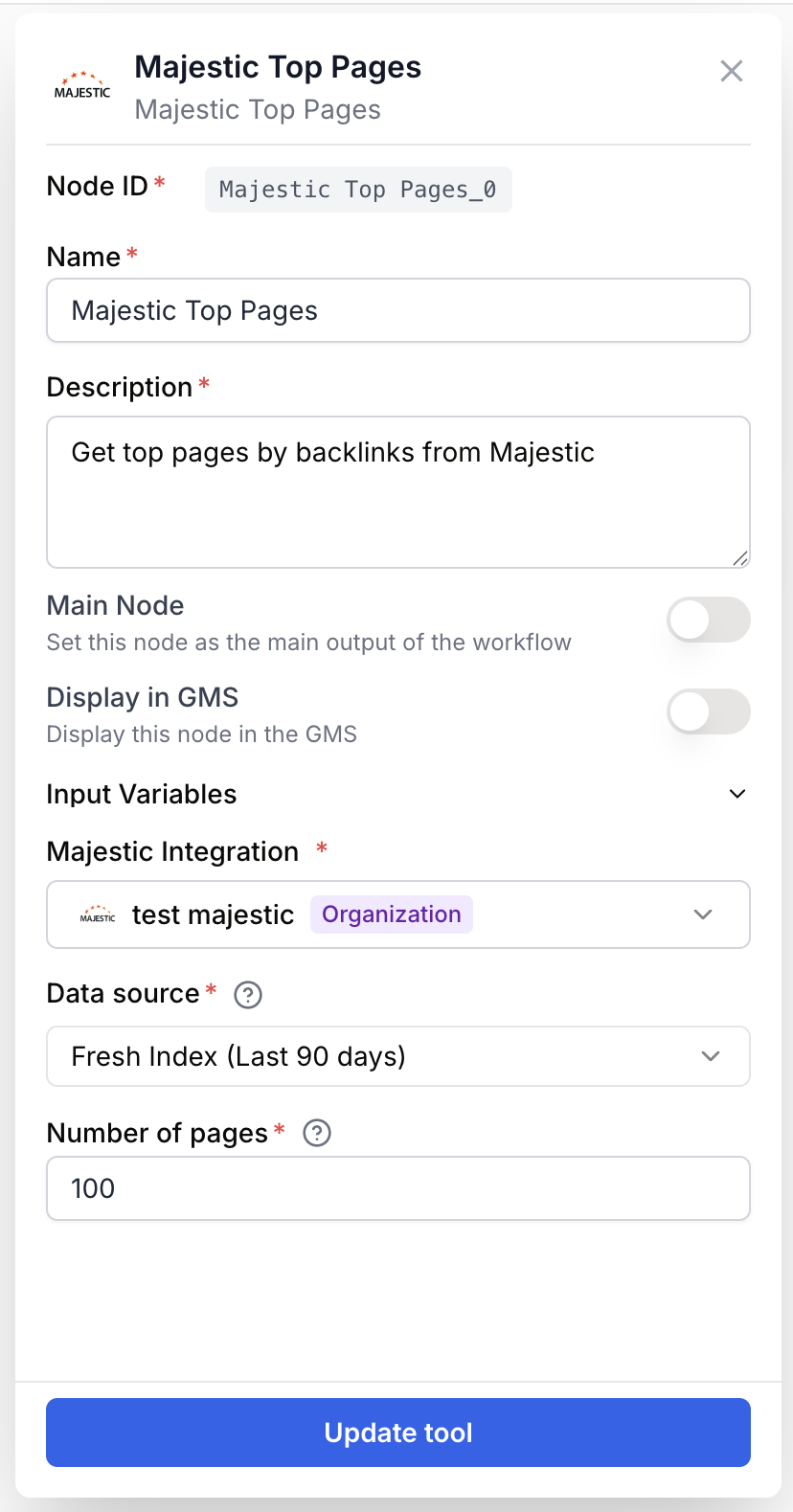
Configuring the node requires a Majestic integration plus the domains you want to analyze.
Required fields
Name string required default: Majestic Top Pages Node name — Used to identify this node when running and debugging the workflow (e.g. competitor-top-pages).
Description string required default: Identifies pages from a domain that attract the most backlinks. Analyzes SEO metrics (TF, CF, referring domains) for each page. Node description — Short phrase describing what this Majestic call is for.
Majestic Integration integration required Majestic account — The connected Majestic integration providing the API key. Required, no default.
Domain(s) / Subdomain(s) string[] required Queries — One domain or subdomain per line (for example example.com or blog.example.com). Accepts multiple lines, JSON arrays, and lists from upstream nodes; duplicates and empty lines are removed automatically.
Data source enum required default: Fresh Index type — Choose Fresh Index for the last 90 days of crawl data or Historic Index for the full historical dataset.
Number of pages number required default: 100 Count — Number of top pages to retrieve per domain, sorted by backlink count. Minimum 1, maximum 1000.
Use the Fresh Index for current SEO state and the Historic Index when investigating long-term link patterns or pages that lost backlinks recently.
What does the node output?
The node outputs a single text payload containing the top pages and their Majestic metrics for every queried domain.
How to use the output
In Draft & Goal you do not need to look up a complex system-generated variable name. To use the result:
- Draw a connection from the Majestic Top Pages node output.
- Connect it to the next node input.
- In that next node, create and name your own variable (for example,
top_pages_json). The Majestic response will be injected into it automatically.
top_pages string JSON-encoded payload listing each queried domain with its top pages and SEO metrics (URL, external backlinks, referring domains, Trust Flow, Citation Flow).
Usage examples
Example 1: Audit a single competitor domain
You want to know which pages drive most of a competitor backlink profile.
Configuration:
Domain(s) / Subdomain(s):competitor.comData source:Fresh IndexNumber of pages:25
Generated output (excerpt):
{
  "competitor.com": [
    {
      "url": "https://competitor.com/ultimate-guide",
      "external_backlinks": 12450,
      "referring_domains": 820,
      "trust_flow": 52,
      "citation_flow": 47
    },
    {
      "url": "https://competitor.com/pricing",
      "external_backlinks": 4310,
      "referring_domains": 410,
      "trust_flow": 44,
      "citation_flow": 39
    }
  ]
}
Example 2: Bulk analysis from an upstream list
You have a Create List node feeding multiple domains into the analysis.
Configuration:
Domain(s) / Subdomain(s): connected to a Create List output containingsite-a.com,site-b.com,blog.site-c.comData source:Historic IndexNumber of pages:100
The node returns a single JSON object keyed by domain, ready to feed into a Loop node or a JSON Path Extractor for per-domain processing.
Common issues
Majestic: API key not configured
Cause: No Majestic integration is selected, or the integration was deleted.
Solution: Open Settings > Integrations, connect a Majestic account, then re-select it in the node Majestic Integration field.
Queries (domains or subdomains) are required
Cause: The Domain(s) / Subdomain(s) input is empty or contains only blank lines.
Solution: Provide at least one non-empty domain. If you connect an upstream node, make sure it actually emits values at runtime.
Fewer pages returned than requested
Cause: The domain simply does not have that many indexed pages with backlinks in the chosen index.
Solution: Lower the Number of pages, or switch from Fresh Index to Historic Index to widen the dataset.
Best practices and pitfalls
Keep Number of pages reasonable (25 to 100) for batch analyses. Asking for 1000 pages on dozens of domains multiplies API consumption and slows the workflow without adding much SEO insight.
Pass clean domains without protocols when possible (example.com, not https://example.com/). Majestic accepts both, but a normalized list avoids duplicate keys in the output.
How does it fit into a workflow?
Majestic Top Pages typically sits between a domain-source node and a downstream parser or AI step that turns raw SEO data into actionable insight.
graph LR
    Input[Domains list] --> Top[Majestic Top Pages]
    Top --> Extractor[JSON Path Extractor]
    Extractor --> LLM[LLM analysis]
    LLM --> Sheet[Google Sheet export]
Related nodes
Pull detailed backlink information for the URLs surfaced by Top Pages.
Inspect the anchor text distribution pointing to a domain.
Parse the Top Pages JSON output and extract specific fields.
Iterate over each domain returned to run downstream actions per page.