Fasterize Sitemap
The Fasterize Sitemap node uploads a JSON list of URL entries to the Fasterize edge so a dynamic sitemap is served without touching the origin site.
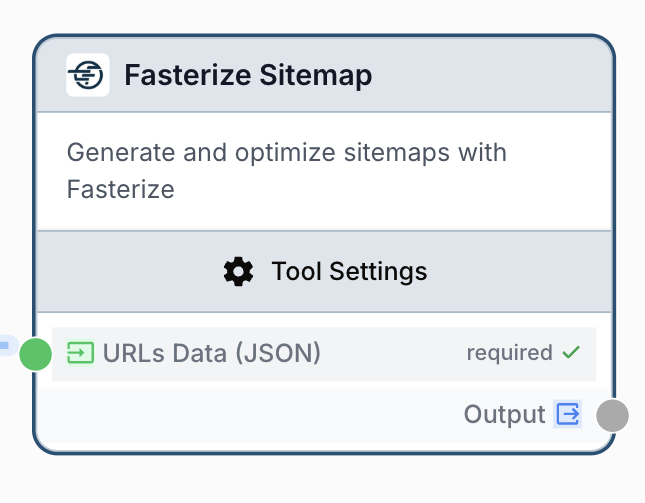
What does the Fasterize Sitemap node do?
The Fasterize Sitemap node pushes a JSON array of URL entries to the Fasterize Sitemap API so a fresh sitemap.xml is served from the edge — without redeploying the origin or relying on the CMS to regenerate it. Each entry must include at least a loc field, plus the usual sitemap attributes (lastmod, changefreq, priority) when needed.
Common use cases:
- Pushing a refreshed sitemap every time a content team publishes new product or blog pages.
- Replacing the sitemap entirely after a site migration or URL restructure.
- Upserting only the URLs that changed in the last hour to keep the sitemap close to real time.
- Driving the sitemap from a workflow that crawls the origin or queries an internal database, instead of relying on a static export.
Quick setup
Connect your Fasterize integration
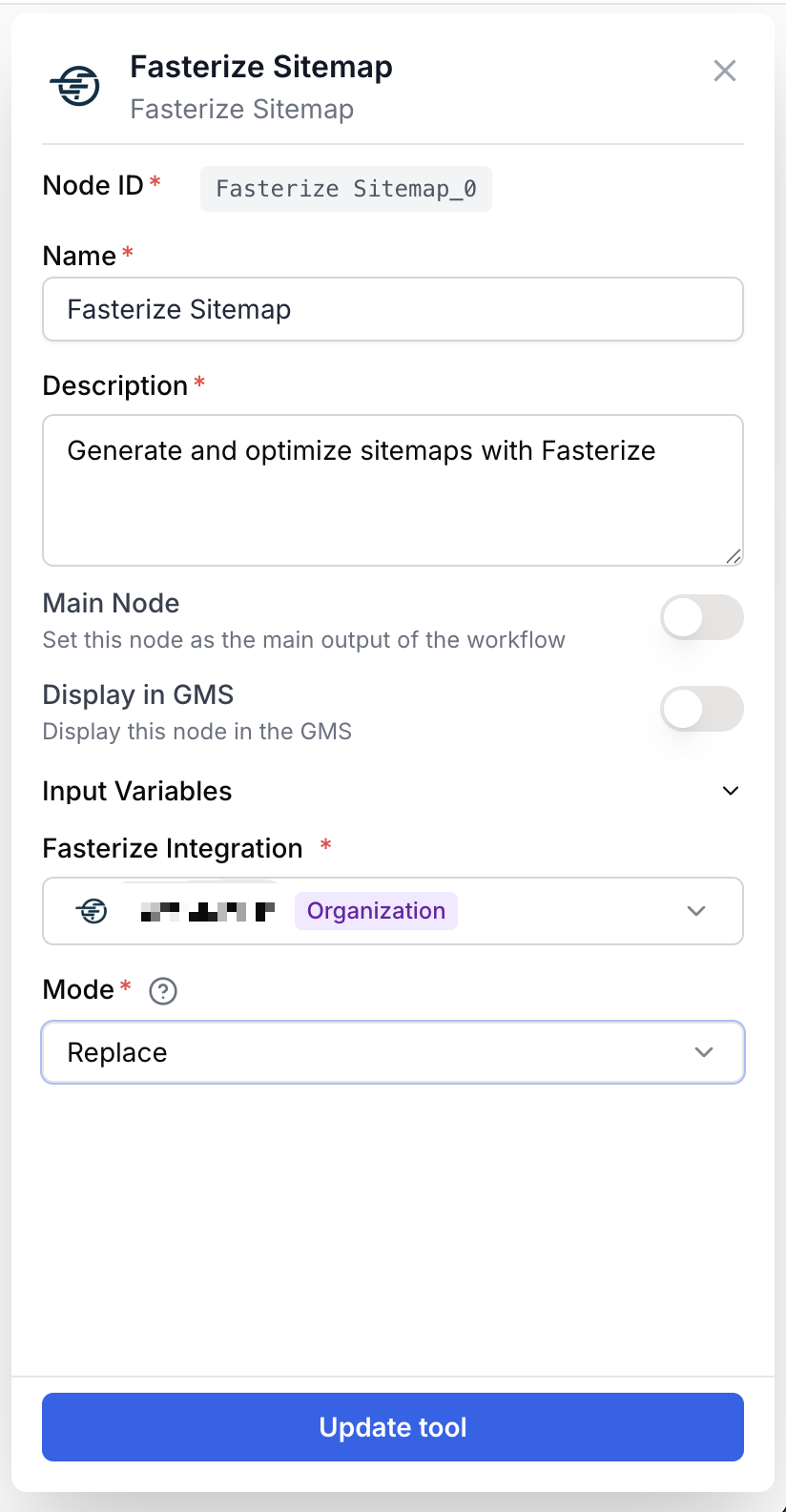
Open the node settings and select your Fasterize integration. If none is available, head to Settings > Integrations and add a Fasterize API token first.
Provide the URLs payload
Wire an upstream node that produces a JSON array of URL objects to the URLs Data (JSON) input. The minimum shape is [ { loc: https://example.com/page } ]; add lastmod, changefreq, or priority when relevant.
Pick the upload mode
In Mode, choose Upsert to merge new URLs with the existing sitemap, or Replace to overwrite the full sitemap with the payload.
Connect the output
Wire the output port to the next node. The result is the Fasterize API response as a string — feed it to a JSON Path Extractor to read counts, or to an Email Sender to notify the team.
Configuration parameters
Required fields
integration_id integration required Fasterize integration — The Fasterize workspace the sitemap is pushed to. The integration token determines which Fasterize-accelerated site receives the URLs.
urls_data string required URLs Data (JSON) — A JSON array of URL objects. Each entry MUST include a loc field; the node rejects the call if any entry is missing it. Optional fields per entry: lastmod (ISO date), changefreq (always, hourly, daily, weekly, monthly, yearly, never), priority (0.0 to 1.0). Can be wired from an input port or pasted as a literal.
Optional fields
mode string default: upsert Mode — upsert merges the payload into the existing sitemap (URLs not in the payload are kept). replace overwrites the entire sitemap with the payload — anything missing disappears.
You do not have to pre-stringify the payload. If the upstream node already produces a JSON object or array (for example a JSON Path Extractor or an LLM with structured output), the node serializes it for you before calling the API.
What does the node output?
The node returns the Fasterize Sitemap service response as a string. On success the response describes the URLs that were accepted; on failure the node returns a JSON-shaped error.
output string The Fasterize Sitemap API response, serialized as a string. Parse it with a JSON Path Extractor or an LLM to extract the accepted-URL count or any per-entry error.
Error shape when the payload is empty or []:
{ "error": "No URLs provided for sitemap" }Error shape when an entry is missing loc:
{ "error": "Each URL entry must have at least a 'loc' field" }Error shape on invalid JSON:
{ "error": "Invalid JSON format for URLs data. Expected array of URL objects" }Error shape when the upstream call fails:
{ "error": "Failed to execute Fasterize Sitemap upload" }Usage examples
Example 1: Upsert freshly published pages
A content team publishes a handful of new articles every morning. You build a workflow that queries the CMS for the past 24 hours and upserts those URLs into the live sitemap.
Configuration:
- Fasterize integration: Production
- Mode:
upsert - URLs Data (JSON): wired from a JSON Path Extractor that reshapes the CMS response.
Input payload:
[
  {
    "loc": "https://example.com/blog/seo-checklist-2025",
    "lastmod": "2025-04-12",
    "changefreq": "weekly",
    "priority": 0.8
  },
  {
    "loc": "https://example.com/blog/sitemap-best-practices",
    "lastmod": "2025-04-12",
    "changefreq": "weekly",
    "priority": 0.7
  }
]
In upsert mode, only the listed URLs are touched — every other URL already in the sitemap stays.
Example 2: Replace the full sitemap after a migration
You restructured the URL tree of a site and want the new URLs to be the only entries Fasterize serves.
Configuration:
- Mode:
replace - URLs Data (JSON): the exhaustive list of canonical URLs after migration.
[
  { "loc": "https://example.com/", "changefreq": "daily", "priority": 1.0 },
  { "loc": "https://example.com/products/", "changefreq": "weekly", "priority": 0.9 },
  { "loc": "https://example.com/products/widget-a", "lastmod": "2025-03-01", "priority": 0.8 },
  { "loc": "https://example.com/products/widget-b", "lastmod": "2025-03-01", "priority": 0.8 }
]
In replace mode, any URL not present in this payload disappears from the sitemap — make sure the list is exhaustive before running the workflow.
Common issues
The node returns 'No URLs provided for sitemap'
Cause: The urls_data input was empty, the literal [], or did not reach the node.
Solution: Check the upstream connection. If the producer is an LLM, add a Find and Replace node beforehand to strip Markdown code fences that would leave the payload empty after parsing.
The node returns 'Each URL entry must have at least a loc field'
Cause: At least one item in the payload is not an object, or is missing the loc key.
Solution: Reshape the payload upstream — usually with a JSON Path Extractor — so every entry is a flat object with loc set to the absolute URL. Drop or fix any entry that does not match before sending.
The node returns 'Invalid JSON format for URLs data'
Cause: The string passed to urls_data is not valid JSON, or it parses to something other than an array of objects.
Solution: Validate the upstream output. If it comes from an LLM, run it through Find and Replace to remove backticks or stray prose; otherwise inspect the raw value with a small Text Output node and fix the producer.
Replace mode wiped URLs I expected to keep
Cause: replace overwrites the full sitemap, not only the URLs in the payload.
Solution: Switch to upsert to add or refresh specific URLs while preserving everything else. Use replace only when you control the full URL list and want a clean reset.
Best practices
Validate the payload upstream. A JSON Path Extractor or a small validation step before this node prevents the entire batch from being rejected because of a single missing loc.
Prefer upsert for incremental updates. replace is destructive: any URL not in the payload disappears from the sitemap. Reserve it for migrations or clean rebuilds where the payload is authoritative.
How does it fit into a workflow?
The Fasterize Sitemap node is typically the last step of a pipeline that collects fresh URLs and pushes them to the edge.
graph LR
    Source[CMS / DB / Crawler] --> Extract[JSON Path Extractor reshapes URLs]
    Extract --> Sitemap[Fasterize Sitemap uploads payload]
    Sitemap --> Notify[Email Sender notifies the team]
Related nodes
Push titles, meta descriptions, and other SEO rules at the edge for the same Fasterize site.
Reshape a CMS or database response into the URL array expected by this node.
Strip Markdown fences and stray characters from LLM output before sending the payload.
Notify the team with the API response after every sitemap update.