Image to Text
The Image to Text node uses AI vision models to read, describe, or extract structured data from images and image URLs based on your instructions.
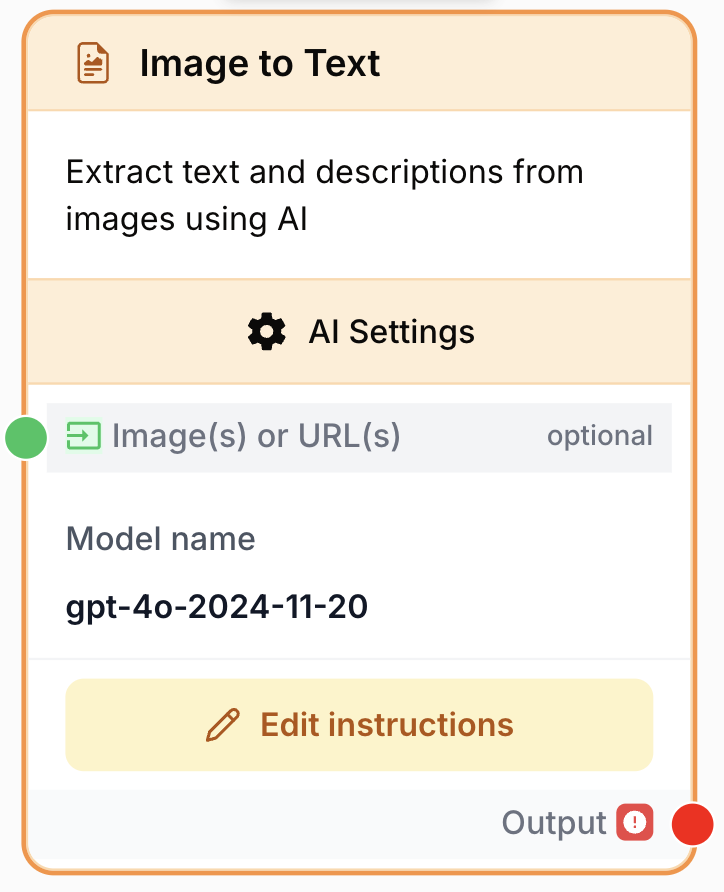
What does the Image to Text node do?
The Image to Text node sends one or more images (uploaded files or URLs) to a vision-capable LLM (OpenAI GPT-4o / GPT-4o mini, Anthropic Claude 3, Google Gemini 1.5) along with a prompt, and returns the model’s textual answer. Use it for OCR, image description, visual question answering, or extracting structured data from charts, screenshots, receipts, and product photos.
Common use cases:
- Reading text from screenshots, receipts, or scanned documents (OCR).
- Generating accessibility-friendly descriptions of marketing assets.
- Extracting structured data (JSON) from charts, tables, or infographics.
- Auditing product images (color, material, on-pack claims) for an e-commerce catalog.
Quick setup
Follow these steps to add and configure the Image to Text node in your workflow:
Add the node to the canvas
Open the Node Library, go to AI > Image, then drag and drop the Image to Text node onto your workspace.
Provide the image input
Connect a node that outputs an image file or an image URL (File node, URL node, Web Scraper, Loop output, Text Input, etc.) to the Image(s) or URL(s) input port. The input accepts file, image, text, string, url, or array types — files and URLs share the same unified input port since version 3.0.
Pick the LLM provider and model
Open the node settings. Choose a provider (OpenAI, Anthropic, or Google), then pick a vision-capable model (e.g. gpt-4o-mini, claude-3-haiku, gemini-1.5-flash).
Write the prompt
In the prompt area on the canvas, describe what the model should extract or answer. You can inject dynamic variables with {{myVariable}} syntax (allowed characters: letters, digits, -, _, .).
Connect the output
Connect the output port to the next node and name the receiving variable in that next node to use the model’s textual answer.
Configuration parameters
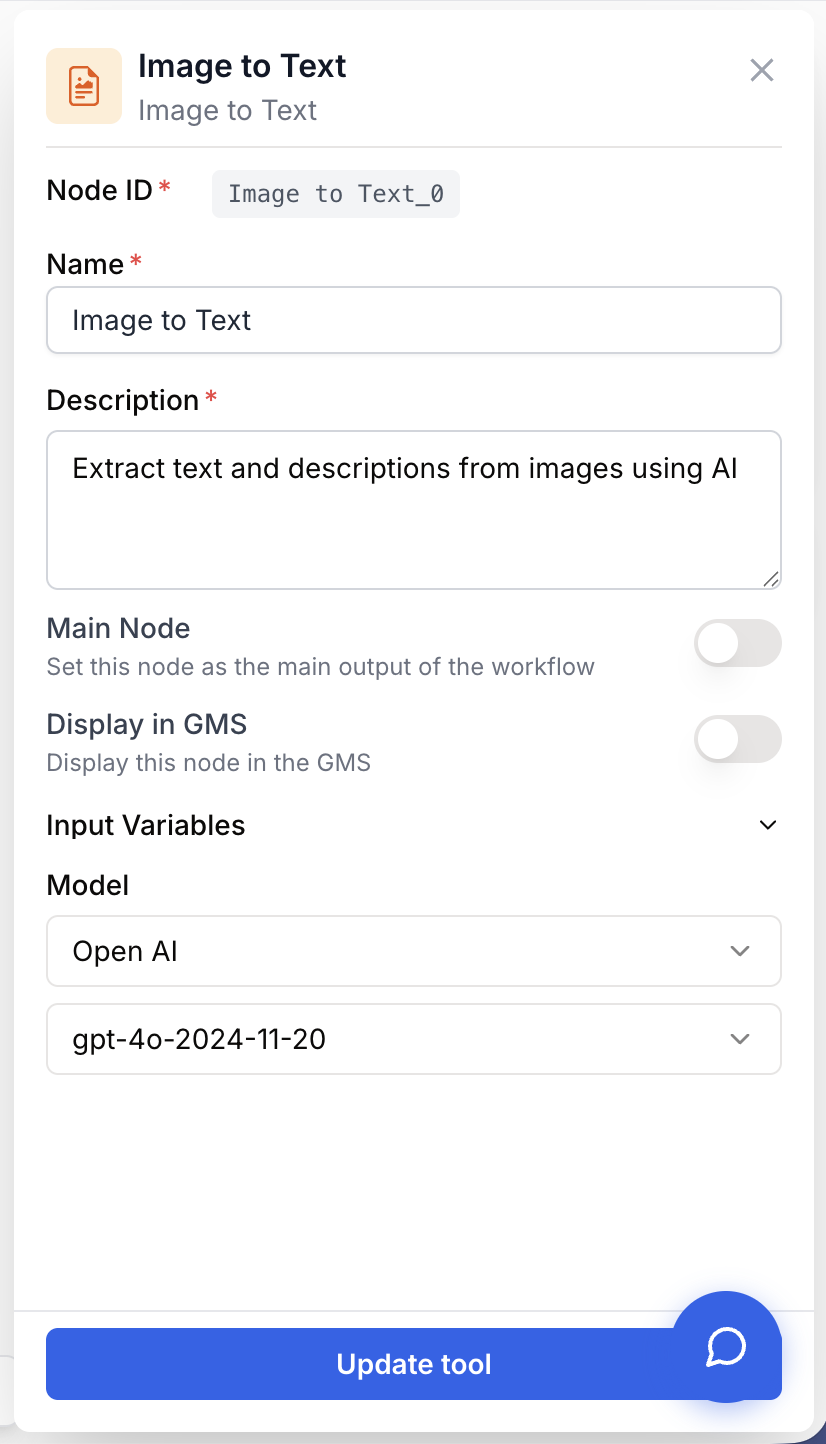
The Image to Text node needs an image source, a vision model, and a prompt. The prompt is the only field validated as required at run time.
Required fields
Name string required default: Image to Text Node name — Used to identify the node in the canvas and in run logs (e.g. “Receipt OCR”, “Product photo describer”).
Description string required default: Understand images with AI. Node description — A short phrase describing what this specific instance does.
modelName llm required Vision model — The LLM that will analyze the images. Picked through the provider + model selectors in the settings panel. Must be a vision-capable model; the list is filtered server-side via the IMAGE_TO_TEXT feature key.
llmProvider string required LLM provider — Set automatically when you pick a model (OPENAI, ANTHROPIC, GOOGLE). Drives the provider-specific API call at runtime.
prompt string required Instructions — What the model should do with the image(s). Edited directly on the canvas. Supports dynamic variables {{myVariable}} (allowed characters: -, _, .). The node fails validation with “Image to Text requires instructions to be configured” if the prompt is empty or whitespace.
Optional fields
input_media media Image(s) or URL(s) — One or more image files or image URLs to analyze. Optional in the schema (you can drive the input entirely from prompt variables), but in practice almost all runs connect an upstream node here. Accepts upstream output types: file, image, text, string, url, array.
Since version 3.0, image files and image URLs share a single unified Image(s) or URL(s) input — you no longer need separate ports. Pass an array to analyze several images in one call (model permitting).
What does the node output?
The node returns the raw textual answer produced by the vision model — exactly what the LLM wrote, with no post-processing. If you asked for JSON, it returns JSON text; if you asked for a description, it returns prose.
How to use the output
In Draft & Goal, you don’t have to look up a system-generated variable name. To use the result:
- Draw a connection from the Image to Text node’s output.
- Connect it to the next node’s input.
- In that next node, create and name your own variable (e.g.
image_description). The model’s answer will be injected into it automatically.
output string The full text returned by the vision model, formatted however your prompt instructed (free-form description, OCR transcript, JSON string, etc.).
Usage examples
Example 1: OCR from a screenshot URL
Pull text out of a screenshot stored at a URL.
Inputs:
- Image(s) or URL(s):
https://example.com/invoice-2024.png - Provider / Model:
OpenAI/gpt-4o-mini - Prompt:
Extract every line of text from this image exactly as it appears, preserving line breaks.
Generated output (string):
ACME Corp
Invoice #INV-2024-0142
Date: 2024-03-12
Subtotal: 1,250.00
Tax (20%): 250.00
Total: 1,500.00
Example 2: Structured chart extraction as JSON
Turn a bar chart into machine-readable data for a downstream JSON Path Extractor.
Inputs:
- Image(s) or URL(s): file output from a previous File node
- Provider / Model:
Anthropic/claude-3-haiku - Prompt:
Read the bar chart and return strict JSON with this shape, nothing else:
{ "title": "...", "x_axis": "...", "y_axis": "...", "bars": [{"label": "...", "value": 0}] }
Generated output (string):
{
  "title": "Monthly active users 2024",
  "x_axis": "Month",
  "y_axis": "MAU (thousands)",
  "bars": [
    {"label": "Jan", "value": 120},
    {"label": "Feb", "value": 135},
    {"label": "Mar", "value": 148}
  ]
}
Common issues
Image to Text requires instructions to be configured
Cause: The prompt field is empty or contains only whitespace. The node-level validator blocks the run before the LLM is called.
Solution: Open the node, type clear instructions in the prompt area, and re-run. Even a one-line prompt like Describe this image. is enough to pass validation.
Image to Text node only accepts image files or URLs as input
Cause: You connected an upstream output whose type isn’t in the allowed set (file, image, text, string, url, array) — for example a number or a boolean.
Solution: Insert a converter (Text Input, URL node) before the Image to Text node, or pick a different upstream output that yields one of the accepted types.
The model answer is wrong, vague, or hallucinated
Cause: Either the chosen model is too small for the task (e.g. tiny text, dense charts), or the prompt is ambiguous.
Solution: Try a stronger model (gpt-4o, claude-3-opus, gemini-1.5-pro), narrow the prompt (“Return only the total amount as a number”), or split the image upstream.
The image URL can't be fetched
Cause: The URL requires authentication, returns a non-image MIME type, or is geo/IP-restricted from the LLM provider.
Solution: Download the asset first via a File or Web Scraper node and feed the file output into Image to Text instead of the URL.
Best practices and pitfalls
Match the model to the task: use gpt-4o-mini or claude-3-haiku / gemini-1.5-flash for cheap bulk OCR, and reserve gpt-4o, claude-3-opus, or gemini-1.5-pro for dense charts, handwriting, or fine-grained product audits.
Costs scale with image count and resolution. Each image is a separate billed input, and high-resolution images burn more tokens than thumbnails. When looping over a catalog, downscale upstream and start with a fast/cheap model — measure quality before promoting to a premium model.
How does it fit into a workflow?
Image to Text typically sits between an image source (File, URL, Web Scraper, Loop) and a downstream parser or final LLM. Here’s a typical pattern for extracting structured data from a batch of product photos:
graph LR
    Files[File node: product images] --> Loop[Loop]
    Loop --> ITT[Image to Text
<br/>extract attributes as JSON]
    ITT --> FR[Find and Replace
<br/>strip Markdown fences]
    FR --> JPE[JSON Path Extractor]
    JPE --> LLM[Final LLM node]
Related nodes
Run a follow-up text-only prompt over the description Image to Text produced.
Same idea for videos: extract transcripts or scene descriptions.
Pick fields out of the JSON the vision model returned.
Strip Markdown fences or stray characters before parsing the model’s answer.
Run Image to Text over a list of files or URLs in a single workflow run.