Google Search Results Count
The Google Search Results Count node returns the exact number of Google results for a query using a binary search across pages, with full operator, country, locale, and date range support.
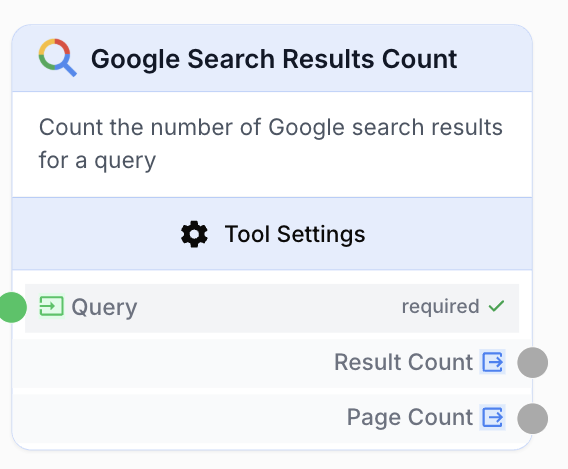
What does the Google Result Count node do?
The Google Search Results Count node runs a Google query and returns the real number of results, not Google’s headline estimate (which is often inaccurate). It paginates through actual SERP pages with a binary search algorithm to give you an exact count and the matching page count.
It supports all Google operators (site:, intitle:, inurl:, -inurl:, etc.), Google Search and Google News, country and locale targeting, location-based geo-targeting, URL blacklists, and date filtering (preset ranges or custom dates that can be driven by upstream variables).
Common use cases:
- Tracking how many pages Google indexes for a domain with
site:yourdomain.com - Comparing topical content volume across competitor sites for SEO benchmarking
- Measuring keyword coverage for a domain with
site:yourdomain.com intitle:keyword - Monitoring news result counts over time on a topic with date-range filtering
Quick setup
Add the node to the canvas
Open the Node Library, go to Integrations > Google, then drag and drop the Google Search Results Count node onto your workspace.
Connect the query input
Connect the Query input port to a node that produces the search query (a Text Input, an LLM output, or any string source). The query supports all Google search operators.
Configure search settings
In the node settings, choose the search Type (Search or News), the Country and Locale, and optionally a Location for geo-targeting and a Blacklist URLs list to exclude domains.
Configure the date range (optional)
Pick a preset (Last week, Last month, Last 3/6 months, Last year) or Custom to set explicit start and end dates. With Custom, you can tick Use variable for start/end date to receive dates dynamically from upstream nodes.
Connect the outputs
Connect Result Count and/or Page Count to downstream nodes. Both are strings ready to be consumed by an LLM, a Conditional, or any text-aware node.
Configuration parameters
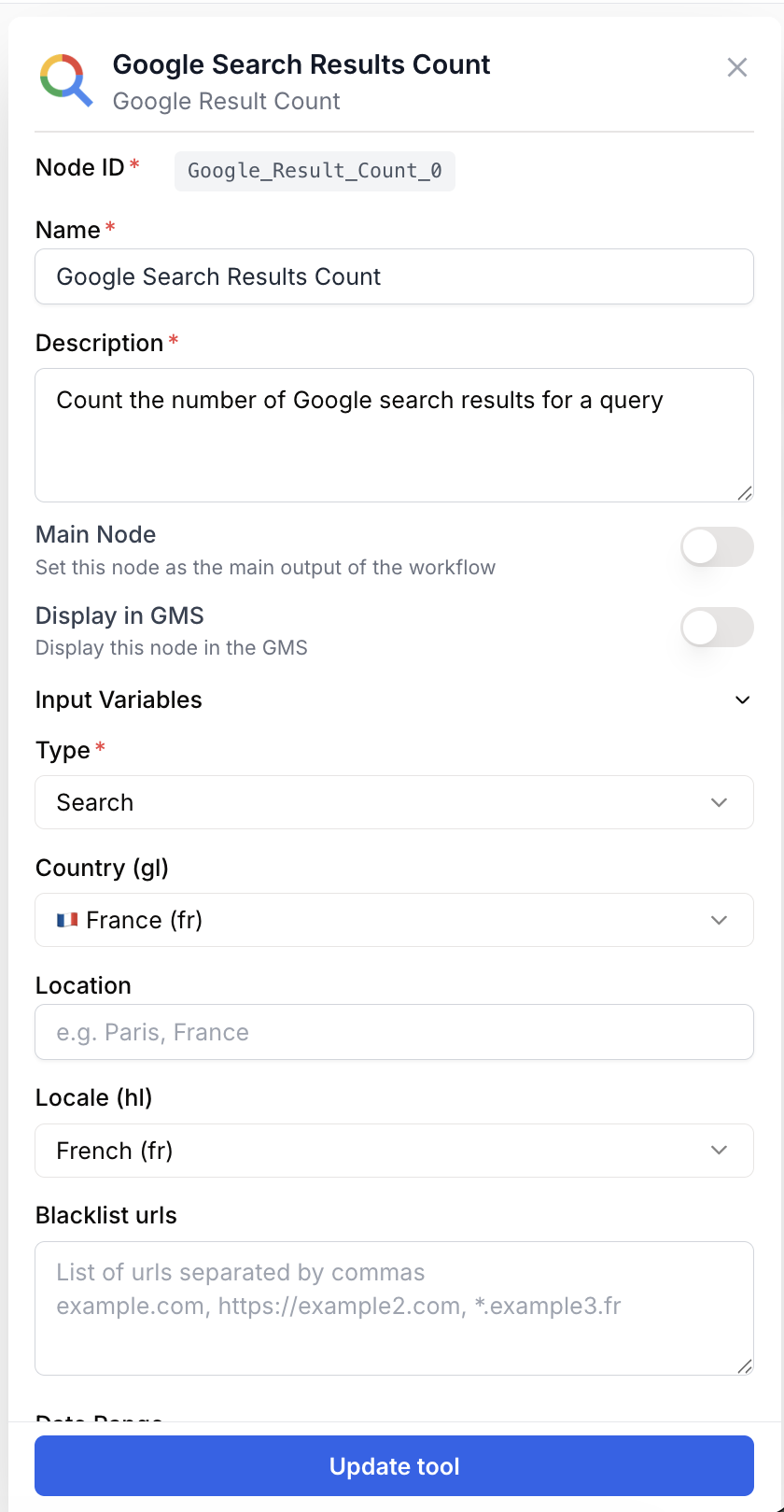
Required fields
Query string required Search query — The Google query to evaluate. Supports all Google operators: site:, intitle:, inurl:, -inurl:, quoted phrases, etc. Example: site:lefigaro.fr intitle:russie. Connected from an upstream node — accepts a single string only, not a list.
Type select required default: Search Search type — Search for the standard Google web search, News for Google News.
Optional fields
Country (gl) select default: France (fr) Country parameter — Google gl parameter. Controls which regional results are returned.
Location string Geo-targeted location — A specific location string (e.g. Paris, France) for finer geo-targeting on top of the country parameter.
Locale (hl) select default: French (fr) Locale parameter — Google hl parameter. Controls the language of search results.
Blacklist urls textarea Excluded URLs — Comma-separated list of URLs to exclude from results. Each entry is appended to the query as a -inurl: operator. Example: example.com, ads.example.fr, *.spam.com.
Date Range select default: None Date filter — Restricts results by publication date. Options: None, Last week, Last month, Last 3 months, Last 6 months, Last year, Custom. With Custom, the Start date and End date fields appear.
Start date string Custom start date — Lower bound for the date filter, in YYYY-MM-DD format. Available only when Date Range is Custom. Tick Use variable for start date to expose an input_start_date connectable input port instead of typing a fixed date.
End date string Custom end date — Upper bound for the date filter, in YYYY-MM-DD format. Available only when Date Range is Custom. Must be greater than or equal to the start date. Tick Use variable for end date to expose an input_end_date connectable input port.
When Use variable for start/end date is enabled, template variables like {{startDate}} or {{endDate}} are resolved at runtime from upstream node outputs, so the same workflow can be reused for any time window.
What does the node output?
The node produces two string outputs containing the result of the binary search count.
result_count string The total number of real Google results found for the query, as a string (e.g. 1234). Capped at 500 (50 pages x 10 results), which is the practical maximum Google itself returns.
page_count string The number of Google result pages that contain results, as a string (e.g. 50).
Usage examples
Example 1: Site indexation tracking
Track how many pages Google indexes for your domain over time.
Configuration:
- Query:
site:example.com - Type: Search
- Country: France (fr)
- Date Range: None
Output: result_count: 1234, page_count: 50
Pipe result_count into a Google Sheets node to log indexation snapshots day after day.
Example 2: News topic coverage with a preset range
Count how many news articles a publisher released on a topic last month.
Configuration:
- Query:
site:lemonde.fr intitle:ukraine - Type: News
- Date Range: Last month
Output: result_count: 42, page_count: 5
Connect result_count to a Conditional node to alert when coverage exceeds a threshold.
Example 3: Custom date range driven by upstream variables
Build a reusable monitoring workflow where the date window comes from upstream nodes (a Date node, a Text Input, or another tool).
Configuration:
- Query:
site:lefigaro.fr intitle:russie - Date Range: Custom
- Use variable for start date: checked (exposes
input_start_dateport) - Use variable for end date: checked (exposes
input_end_dateport)
Connect upstream date sources to the new input ports. The node resolves {{startDate}} and {{endDate}} at runtime.
Example 4: Competitor benchmark on a single keyword
Compare how many indexed pages two competitors have on the same topic.
Configuration A: Query = site:competitor-a.com intitle:pricing
Configuration B: Query = site:competitor-b.com intitle:pricing
Run both nodes in parallel, then feed the two result_count values into a single LLM node that summarizes the gap.
Best practices
Use precise queries. Combine site: with intitle: or quoted phrases to count meaningful subsets rather than the whole index — the binary search is fastest and most accurate when the result set fits well under 500.
Externalize the dates for any monitoring workflow. Drive start_date and end_date from a Date node so the workflow can be re-run on a schedule without manual edits.
Result counts are capped at 500. Google rarely lets you paginate beyond 50 pages, so any count above 500 is reported as 500. If you suspect more, narrow the query with operators rather than expecting a higher number.
Country and locale matter. A query against site:lemonde.fr from Country = US, Locale = en may return very different counts than from France / fr. Match the geography of the target site for stable counts.
Common issues
The node returns 0 even though the query works in Google
Cause: The query might be too restrictive once -inurl: exclusions from Blacklist urls are appended, or the Date Range is excluding the matching pages.
Solution: Temporarily clear Blacklist urls and set Date Range to None to confirm the base query works, then reintroduce filters one at a time.
I get a validation error: Start date must be before or equal to end date
Cause: With Date Range set to Custom, the start date is later than the end date.
Solution: Pick a start date earlier than or equal to the end date. If both come from upstream variables, make sure the upstream nodes output values in YYYY-MM-DD format and in the right order.
The result count looks low compared to Google's headline number
Cause: Google’s headline estimate is famously inflated. This node returns the actual count by paginating real results, which is almost always smaller.
Solution: Trust the node’s output for monitoring and benchmarking. If you need consistency with Google’s headline number, this node is not the right tool.
My input_start_date / input_end_date ports do not appear
Cause: The connectable date input ports only show up when Date Range is Custom and the corresponding Use variable for start/end date checkbox is ticked.
Solution: Set Date Range to Custom first, then tick the externalize checkbox(es). The ports will appear on the node body.
How does it fit into a workflow?
Google Search Results Count is typically used as a measurement step: you build a query upstream, count, then route the count to logging, alerting, or AI summarization.
graph LR
    Date[Date node] --> GRC[Google Search Results Count]
    Query[Text Input: query] --> GRC
    GRC --> Cond[Conditional checks threshold]
    Cond --> Sheet[Google Sheets logs result]
    Cond --> LLM[LLM summarizes findings]
Related nodes
Fetch the full SERP — organic results, snippets, related questions — when you need more than just a count.
Pull search analytics directly from Google Search Console for owned domains.
Generate dynamic start and end dates to drive the Custom date range with externalized variables.
Branch your workflow based on the result count (e.g. trigger an alert when a threshold is crossed).