Split List
The Split List node divides a list into smaller batches of a given size, returning an array of arrays for batched downstream processing.
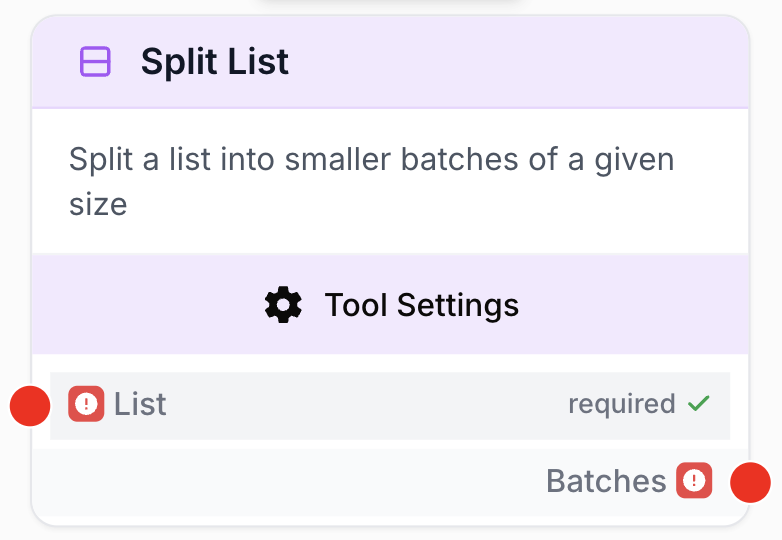
What does the Split List node do?
The Split List node takes a single list and chops it into smaller batches of a fixed size. It outputs an array of arrays, where each inner array contains up to batch_size items. The last batch may be shorter if the list length is not evenly divisible by the batch size.
It is the building block for any “process N items at a time” pattern in a workflow: rate-limiting, parallelization with Loop, paginated displays.
Common use cases:
- Batch API calls so each request stays under a provider’s per-request item cap or rate limit.
- Chunk a large dataset (Sheets rows, scraped URLs) into manageable pieces before sending each chunk to an LLM.
- Paginate results for downstream display or staged processing.
Quick setup
Follow these steps to add and configure the Split List node in your workflow:
Add the node to the canvas
Open the Node Library, go to Tools, then drag and drop the Split List node onto your workspace.
Connect the list input
Connect the output of any node that produces a list (Create List, Google Sheets, JSON Path Extractor, etc.) to the list input on the left of the node.
Set the batch size
Open the node settings and set Batch Size to the number of items each batch should contain. The minimum is 1 and the maximum is 100.
Connect the output
Connect the batches output (right of the node) to the next node — typically a Loop node that iterates over each batch.
Configuration parameters
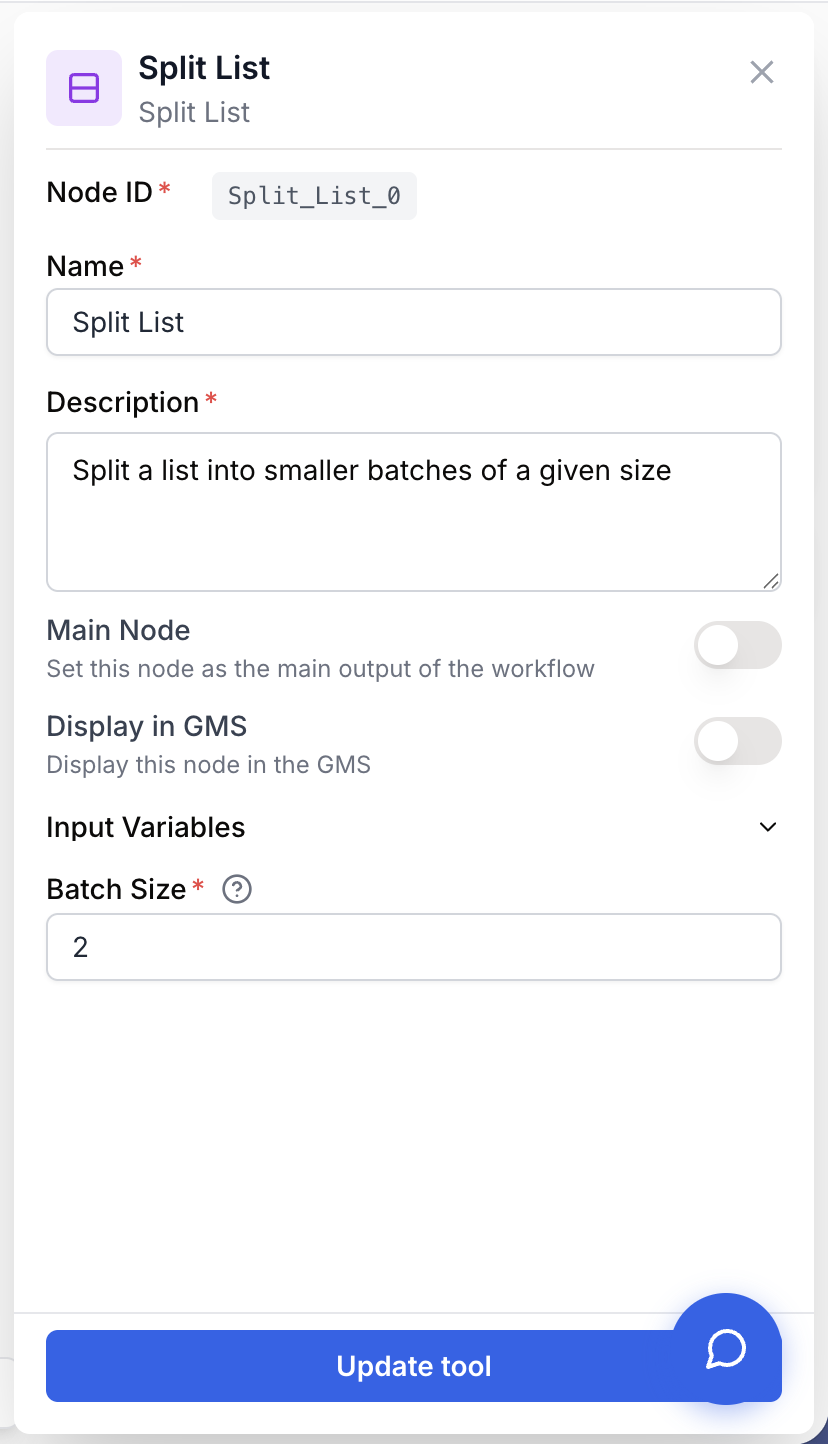
The node has one required input and one parameter.
Required fields
Name string required default: Split List Node name — Useful for identifying the node when running and debugging the workflow (e.g. “Batch URLs by 10”).
Description string required default: Split a list into smaller batches of a given size Node description — Short phrase describing what this Split List node does in your workflow.
list json required Input list — The list to split. Accepts any valid JSON array. If a JSON string is passed, the node parses it; if parsing fails the node raises “Split List node: Input is not a valid JSON list”.
Optional fields
batch_size number default: 2 Batch size — Number of items per batch. Must be between 1 and 100 inclusive. The last batch may contain fewer items if the list length is not a multiple of batch_size.
Pick batch_size to match the constraint downstream of the node — your API’s per-request limit, your LLM’s token budget, or the parallelism your runner can handle.
What does the node output?
The node outputs a single value, batches, containing an array of arrays. Each inner array holds up to batch_size items in their original order.
batches json An array of arrays. Each inner array is one batch of up to batch_size items from the input list, in the same order as the input.
How to use the output
In Draft & Goal, draw a connection from the Split List batches output to the next node (most often a Loop). Inside the Loop, each iteration receives one batch as its current item, which you can then feed to an API Connector, LLM, or any downstream node.
Usage examples
Example 1: Batch API calls to respect rate limits
You have 100 URLs to scrape and the target API allows 10 items per request. Split List divides the list into 10 batches of 10, and Loop sends each batch sequentially.
Configuration:
batch_size:10
graph LR
    A[Create List] --> B[Split List]
    B --> C[Loop]
    C --> D[API Connector]
Output (truncated):
{
  "batches": [
    ["https://a.com", "https://b.com", "..."],
    ["https://k.com", "https://l.com", "..."]
  ]
}
Example 2: Chunk Sheets rows for parallel LLM analysis
A spreadsheet contains 50 rows. Split List creates 10 batches of 5 rows. Each batch is sent to an LLM for analysis, and Merge Lists reassembles the results.
Configuration:
batch_size:5
graph LR
    A[Google Sheets] --> B[Split List]
    B --> C[Loop]
    C --> D[LLM analyze batch]
    D --> E[Merge Lists]
Common issues
Output is a single batch containing every item
Cause: batch_size is greater than or equal to the number of items in the input list, so all items fit in one batch.
Solution: Lower batch_size so that list.length / batch_size > 1. If you genuinely have a small list, this behavior is expected.
Error: Split List node: Input is not a valid JSON list
Cause: The list input was a string that could not be parsed as JSON, or upstream produced something other than an array (an object, a plain string, null).
Solution: Make sure the upstream node outputs a real list. If you build the list manually, ensure it is valid JSON like ["a", "b", "c"]. Use a JSON Path Extractor to pull an array out of a nested object first.
Error: batch_size must be between 1 and 100
Cause: You set batch_size to 0, a negative number, or a value greater than 100.
Solution: Set batch_size to an integer in the [1, 100] range. For very large workloads, batch in stages: split, process, then merge and split again with a different size.
Loop downstream still hits the rate limit
Cause: Loop iterates over batches sequentially, but the items inside a batch are still sent in parallel by the downstream node. Reducing the number of batches does not reduce in-batch concurrency.
Solution: Lower batch_size so each batch itself stays under the per-window rate limit. If the API limits per-request item count, set batch_size to that exact cap.
Best practices
The canonical pattern is Split List → Loop → (work) → Merge Lists. Split creates the chunks, Loop iterates, the work node processes one batch at a time, and Merge Lists flattens the results back into a single list for downstream nodes.
batch_size is hard-capped at 100. If you need bigger batches for performance, the cap will silently restrict you — the node raises an error rather than honoring the requested size. Plan around the limit.
Related nodes
Build the input list when you don’t have one from an upstream source.
Iterate over the batches produced by Split List, one at a time.
Flatten the per-batch results back into a single list after the Loop completes.
Use Slice List instead when you need a single sub-range, not a full split.
Trim the list before splitting so only relevant items end up in batches.
Inspect the input length to pick a sensible batch_size.